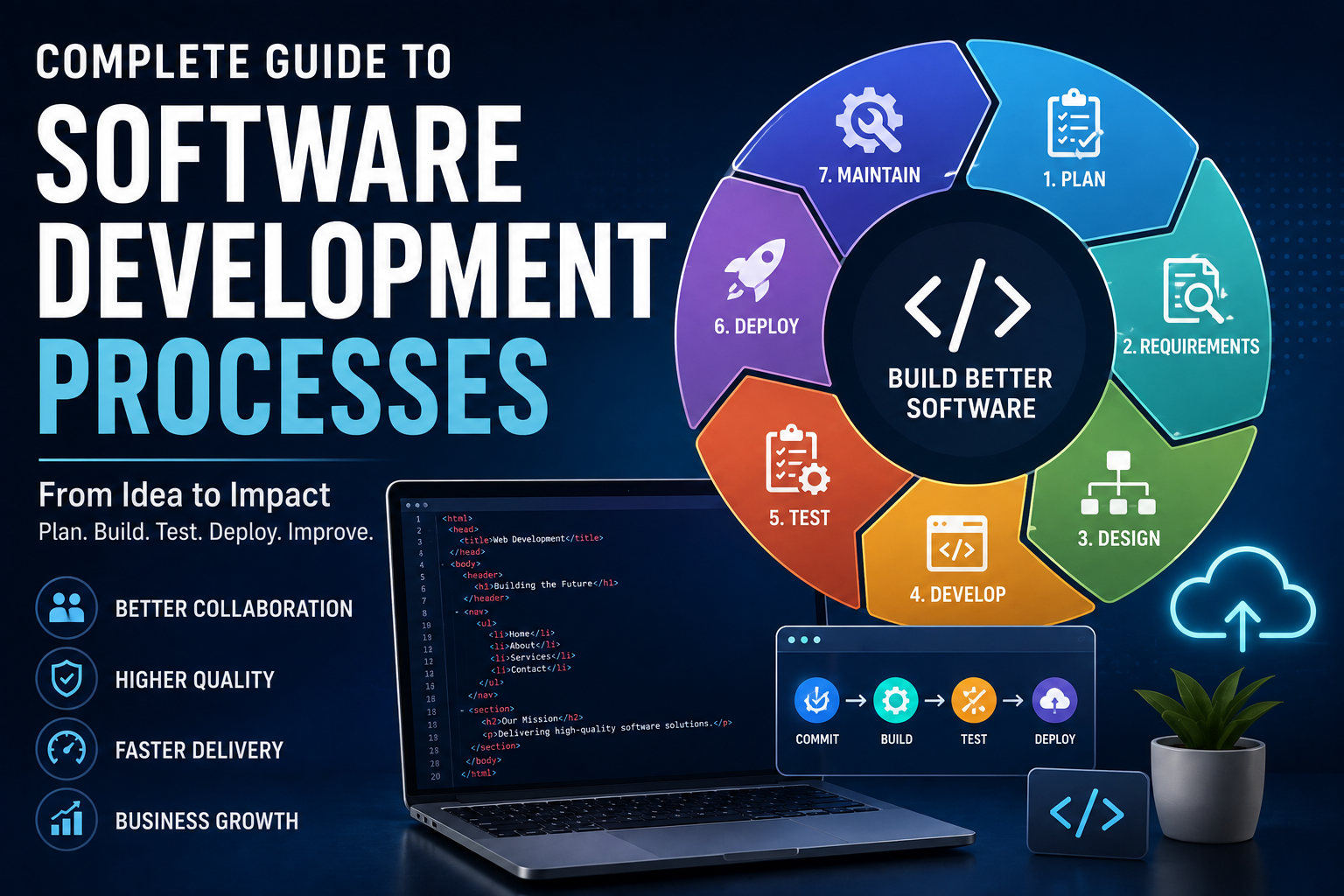
Complete Guide to Software Development Processes
Software is rarely built successfully by simply writing code from start to finish. Behind most reliable applications, websites, platforms, and digital services is a structured process that helps teams understand requirements, design solutions, build features, test systems, and maintain them over time.
That process is commonly referred to as the software development process or Software Development Life Cycle (SDLC).
Whether a team is creating a small mobile application or a large enterprise platform, understanding how software moves from an initial idea to a working product can help developers, project managers, business leaders, and users better understand what goes into building modern software.
What Is a Software Development Process?
A software development process is a structured approach for planning, designing, developing, testing, deploying, and maintaining software.
The process provides a framework for turning an idea or business requirement into a functioning software product.
A typical development process may include:
- Planning
- Requirements analysis
- System design
- Development
- Testing
- Deployment
- Maintenance
The exact structure varies between organizations and projects. Some teams follow a highly structured model, while others use iterative approaches that deliver software in smaller increments.
The goal is not simply to produce code. A good development process helps teams build software that is useful, maintainable, secure, reliable, and aligned with user needs.
For a broader explanation of the concepts behind software itself, see how modern software works.
Why Software Development Processes Matter
Software projects can become complicated quickly.
Multiple developers may work on the same codebase, designers may create user interfaces, product managers may define requirements, security specialists may review risks, and customers may provide feedback.
Without a clear process, teams can encounter problems such as:
- Unclear requirements
- Missed deadlines
- Poor communication
- Unexpected costs
- Security vulnerabilities
- Difficult-to-maintain code
- Inadequate testing
- Features that users do not actually need
A development process creates shared expectations about how work should move from one stage to another.
It also gives teams opportunities to identify problems before they become more expensive to fix.
The Main Stages of Software Development
Although different methodologies use different terminology, most software projects involve several fundamental activities.
1. Planning
Planning is where a software project begins to take shape.
The team identifies the problem the software is intended to solve, considers the target users, evaluates feasibility, and establishes initial objectives.
Important questions may include:
- What problem are we solving?
- Who will use the software?
- What capabilities are required?
- What resources are available?
- What technologies might be appropriate?
- What risks could affect the project?
- How will success be measured?
Planning helps prevent teams from beginning development without understanding what they are trying to accomplish.
2. Requirements Analysis
Requirements describe what the software needs to do and what users or organizations expect from it.
Requirements can be divided broadly into two categories.
Functional requirements describe what the system should do.
Examples include:
- Users can create accounts.
- Customers can place orders.
- Administrators can generate reports.
- Users can reset forgotten passwords.
Non-functional requirements describe characteristics such as performance, reliability, security, scalability, and usability.
For example, a system might need to support thousands of simultaneous users while protecting sensitive customer information.
Clear requirements help developers understand what they are building and give testers criteria against which the software can be evaluated.
3. Software Design
Once requirements are understood, the team develops a technical design.
Software design determines how the system will be structured and how its components will interact.
Design decisions can include:
- Application architecture
- Database structure
- APIs
- User interfaces
- Authentication
- Data storage
- External integrations
- Security controls
- Programming languages and frameworks
A strong design can make software easier to maintain and expand.
Poor architectural decisions, on the other hand, can create technical limitations that become increasingly difficult to address as the application grows.
For a deeper look at this part of the process, see how software architecture organizes applications.
4. Development
Development is the stage most people associate with software engineering.
Developers translate designs and requirements into working code.
Depending on the project, development may involve:
- Front-end programming
- Back-end programming
- Database development
- API development
- Mobile development
- Infrastructure configuration
- Automated testing
- Security implementation
Understanding what programming is and how it works provides useful context for this stage.
Developers may use different programming languages depending on the requirements of the project. A language such as Python may be appropriate for some types of development, while other projects may require different technologies.
Modern development teams generally use version control systems to track changes to source code.
Developers may also work on separate branches and submit changes for review before they are incorporated into the main codebase. A Git and version control guide for developers provides more detail about this collaborative process.
5. Testing
Testing determines whether software behaves as expected and helps identify defects before users encounter them.
Testing can occur throughout development rather than only after all coding has been completed.
Common types include:
Unit Testing
Tests individual functions or components in isolation.
Integration Testing
Checks whether different parts of the application work correctly together.
System Testing
Evaluates the complete application as an integrated system.
User Acceptance Testing
Determines whether the software satisfies practical user or business requirements.
Performance Testing
Examines how the application behaves under different workloads.
Security Testing
Looks for weaknesses that could expose systems, data, or users to attack.
Automated tests can make repeated testing faster, while manual testing remains useful for scenarios that require human judgment and exploration.
For a more detailed explanation, see what software testing is and how developers ensure software quality.
6. Deployment
Deployment is the process of making software available in its intended environment.
For a web application, this could mean releasing the application to production servers. For a mobile application, deployment may involve publishing a new version through an app store.
Deployment can be performed in different ways.
Some teams release large updates at scheduled intervals, while others use continuous delivery practices to release smaller changes more frequently.
The appropriate strategy depends on the organization’s risk tolerance, infrastructure, product requirements, and development methodology.
7. Maintenance
Software development does not end when an application is deployed.
Once users begin interacting with the software, new issues, requirements, security risks, and improvement opportunities emerge.
Maintenance can involve:
- Fixing bugs
- Applying security updates
- Improving performance
- Updating dependencies
- Adding features
- Improving usability
- Supporting new devices or platforms
- Addressing infrastructure changes
Long-term maintenance can represent a substantial part of the overall software lifecycle.
Understanding the Software Development Life Cycle
The Software Development Life Cycle, commonly abbreviated as SDLC, provides a framework for managing the stages involved in creating and maintaining software.
Different organizations define the SDLC differently, but the fundamental objective remains similar: provide a repeatable process for delivering useful and reliable software.
A simplified lifecycle looks like this:
Planning → Requirements → Design → Development → Testing → Deployment → Maintenance
In iterative methodologies, however, these activities may happen repeatedly rather than as isolated stages.
For example, a team might plan a small feature, design it, build it, test it, release it, gather feedback, and then repeat the process for the next improvement.
Major Software Development Methodologies
There is no single development methodology that works for every project.
Different methodologies organize development work in different ways.
Waterfall Development
Waterfall is a sequential approach in which development progresses through relatively defined stages.
A typical sequence might be:
Requirements → Design → Development → Testing → Deployment
Waterfall can be useful when requirements are stable and extensive planning is necessary.
However, making significant changes later in the process can be difficult because earlier decisions may already have been finalized.
Agile Development
Agile development emphasizes iterative work, frequent feedback, collaboration, and adaptability.
Rather than attempting to define the entire product in detail before development begins, teams typically divide work into smaller increments.
Agile approaches can help teams respond to changing requirements and learn from user feedback during development.
Scrum
Scrum is a framework commonly used by software teams working in an Agile environment.
Work is organized into short development periods known as sprints.
Teams typically maintain a prioritized backlog of work and regularly review progress.
Scrum commonly involves roles and activities such as:
- Product ownership
- Development
- Sprint planning
- Daily coordination
- Sprint reviews
- Retrospectives
Kanban
Kanban focuses on visualizing work and managing the flow of tasks.
A simple Kanban board might contain columns such as:
To Do → In Progress → Review → Done
Teams can use limits on work in progress to reduce bottlenecks and improve workflow.
DevOps
DevOps combines development and operations practices to improve collaboration and accelerate the delivery of software.
DevOps often involves:
- Continuous integration
- Continuous delivery
- Infrastructure automation
- Monitoring
- Automated testing
- Deployment automation
- Collaboration between development and operations teams
The broader objective is to make software delivery more reliable and repeatable.
The relationship between development and operations is explored further in how DevOps connects software development with IT operations.
Agile Versus Waterfall
The choice between Agile and Waterfall should depend on the project rather than ideology.
| Factor | Agile | Waterfall |
|---|---|---|
| Requirements | Can evolve | Usually defined earlier |
| Development | Iterative | Sequential |
| Feedback | Frequent | Often concentrated at specific stages |
| Change | Generally easier to accommodate | Can be more difficult later |
| Releases | Often frequent | Often less frequent |
| Planning | Continuous | Extensive upfront planning |
| Best suited to | Changing requirements | Stable requirements |
Many organizations also combine elements from multiple approaches.
How Developers Work Together
Modern software development is usually collaborative.
Even small projects may involve multiple contributors working on different parts of a system.
Version Control
Version control systems record changes to source code and allow developers to work collaboratively.
Git is one of the most widely used version control systems.
Developers can create branches for individual features or fixes, make changes, and then merge approved work into shared branches.
The Git and version control guide for developers explains this part of the development workflow in greater detail.
Code Reviews
Code reviews allow other developers to inspect changes before they become part of the main codebase.
Reviews can identify:
- Bugs
- Security problems
- Maintainability issues
- Inconsistent coding practices
- Unnecessary complexity
They also provide an opportunity for developers to share knowledge.
Issue Tracking
Teams use issue-tracking systems to manage tasks, bugs, feature requests, and other work.
Each issue can contain information about what needs to be done, who is responsible, its priority, and its current status.
The Role of Documentation
Documentation is an important but sometimes overlooked part of software development.
Useful documentation may include:
- Architecture documentation
- API documentation
- Installation instructions
- User guides
- Development guidelines
- Database documentation
- Security procedures
- Troubleshooting information
Good documentation can reduce onboarding time and make systems easier to maintain.
Documentation is particularly important for projects that are expected to operate for many years or be maintained by different teams.
Software Development and Security
Security should be considered throughout the development process rather than added after the software is complete.
A security-focused development process can include:
- Secure authentication
- Access controls
- Input validation
- Encryption
- Secure dependency management
- Security testing
- Logging and monitoring
- Vulnerability management
- Secure coding practices
Developers should also understand that security requirements can vary significantly depending on the type of application and data being handled.
Software processing financial, health, personal, or business-critical information may require substantially stronger controls than a simple informational application.
The Importance of Quality Assurance
Quality assurance goes beyond finding bugs.
It involves establishing processes that help teams consistently produce reliable software.
Quality practices can include:
- Automated testing
- Code reviews
- Development standards
- Continuous integration
- Static analysis
- Performance testing
- Security testing
- Monitoring after deployment
The earlier defects are identified, the easier they are generally to address.
Common Software Development Challenges
Even well-organized development teams face challenges.
Changing Requirements
Business priorities can change during development.
Teams need processes for evaluating and incorporating legitimate changes without allowing uncontrolled scope growth.
Technical Debt
Technical debt occurs when short-term implementation decisions create additional maintenance work later.
Not all technical debt is harmful. Sometimes a team intentionally chooses a simpler solution to meet an urgent deadline.
The problem arises when technical debt accumulates without being managed.
Communication Problems
Misunderstandings between developers, designers, managers, and customers can result in software that technically works but does not solve the intended problem.
Clear communication is therefore an essential part of development.
Integration Problems
Applications frequently depend on external systems and internal services.
Differences between APIs, data formats, authentication systems, or system architectures can create integration challenges.
Scalability
An application that works well for a small number of users may struggle as usage grows.
Scalability should therefore be considered during architecture and design rather than only after performance problems appear.
Best Practices for Software Development
Several practices can improve the quality and sustainability of software projects.
Start With the Problem
Before selecting a programming language or framework, make sure the team understands the problem it is solving.
Keep Requirements Clear
Requirements should be specific enough to guide development while remaining flexible enough to accommodate legitimate changes.
Build Incrementally
Breaking large projects into smaller deliverables makes progress easier to measure and problems easier to isolate.
Automate Repetitive Work
Automation can improve consistency and free developers from repetitive tasks.
Test Continuously
Testing throughout development is generally more effective than waiting until the end of a project to discover problems.
Review Code
Peer review can improve quality and spread technical knowledge across a team.
Monitor Production Systems
Software can behave differently in real-world environments than it does during development.
Monitoring helps teams identify performance problems, errors, and unusual behavior after deployment.
For more on application speed and optimization, see how developers optimize software performance and application speed.
Treat Security as a Core Requirement
Security should be incorporated into requirements, architecture, coding, testing, and maintenance.
How AI Is Changing Software Development
Artificial intelligence is increasingly being used as part of software development workflows.
AI-assisted tools can help developers with tasks such as:
- Generating code suggestions
- Explaining unfamiliar code
- Creating tests
- Finding potential bugs
- Generating documentation
- Refactoring code
- Exploring APIs
- Summarizing changes
However, AI-generated code still requires human review.
Developers need to verify correctness, security, performance, licensing considerations, and compatibility with the existing system.
AI can accelerate development, but it does not eliminate the need for software engineering judgment.
How to Choose a Development Process
There is no universal development process that every organization should follow.
A useful choice depends on factors including:
- Project size
- Team experience
- Requirement stability
- Regulatory requirements
- Risk level
- Customer expectations
- Release frequency
- System complexity
- Available resources
A small product team building a rapidly evolving application may benefit from an iterative Agile approach.
A project with highly stable requirements and extensive regulatory constraints may require more structured planning and documentation.
The most effective organizations often adapt their processes to the characteristics of each project.
Building a Sustainable Development Culture
A strong software development process is ultimately about more than project management.
It creates an environment where teams can build, test, release, learn, and improve software consistently.
The best processes balance structure with flexibility. They give developers enough guidance to maintain quality without creating unnecessary bureaucracy.
They also recognize that software is a long-term asset. Code that works today may need to be maintained, secured, scaled, and extended for years.
Where Software Development Processes Are Heading
Software development continues to evolve as cloud infrastructure, automation, artificial intelligence, distributed systems, and new development tools become more accessible.
Yet the fundamental principles remain remarkably consistent.
Successful teams still need to understand user needs, define useful requirements, design sound systems, write maintainable code, test carefully, protect software from security threats, and learn from real-world usage.
The tools will continue to change, but a disciplined development process remains one of the strongest foundations for building software that lasts.