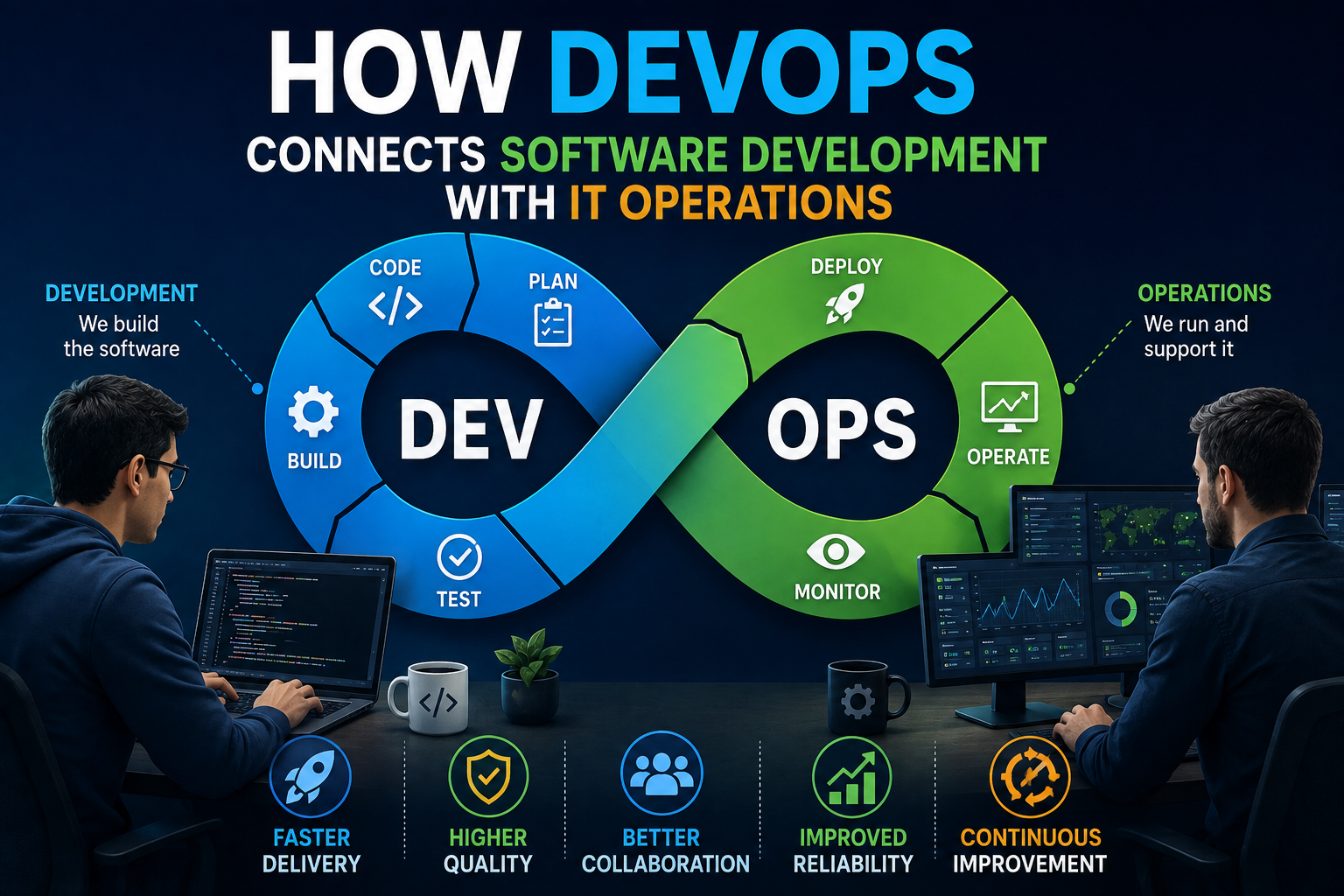
How DevOps Connects Software Development With IT Operations
Software development and IT operations have traditionally had different responsibilities.
Developers focus on writing and improving applications. IT operations teams are responsible for deploying those applications, keeping systems available, managing infrastructure and responding when something goes wrong.
When these groups work in isolation, problems can emerge. Developers may prioritize new features while operations teams focus on stability. A change that works perfectly in a development environment may create unexpected problems after deployment.
DevOps emerged as a way to bring these responsibilities closer together.
Rather than treating development and operations as separate stages of the technology lifecycle, DevOps encourages teams to collaborate continuously around building, testing, deploying and maintaining software.
For a broader understanding of how software moves through its lifecycle, see the Complete Guide to Software Development Processes.
What Is DevOps?
DevOps is a combination of practices, cultural principles and technologies designed to improve collaboration between software development and IT operations.
The name itself combines development and operations.
The central idea is relatively simple: the people who build software and the people responsible for running it should work together throughout its lifecycle.
That can involve:
- Continuous integration
- Automated testing
- Continuous delivery
- Infrastructure as code
- Automated deployments
- Monitoring and observability
- Version control
- Incident management
- Collaborative planning
- Continuous improvement
DevOps is therefore more than a collection of tools.
A company can purchase sophisticated automation software and still struggle with DevOps if its teams do not communicate or share responsibility effectively.
Why Development and Operations Need Each Other
Developers need environments where they can build and test applications efficiently.
Operations teams need applications that can be deployed reliably, monitored effectively and maintained without creating unnecessary risks.
These goals are closely connected.
A developer might create a feature that performs well on a local computer but requires additional infrastructure resources in production. An operations engineer may understand the infrastructure implications but have limited visibility into how the application was designed.
When the teams collaborate earlier, these issues can be identified before they become production problems.
DevOps encourages both sides to think about the complete lifecycle of an application rather than only their individual responsibilities.
Understanding How Modern Software Works can also help explain why development decisions can affect the behavior of applications across different environments.
Breaking Down the Traditional Silo
In a traditional development model, work can move through a sequence that looks something like this:
Develop → Test → Hand Off → Deploy → Operate
The problem is that each handoff can introduce delays and misunderstandings.
Developers may finish their work and send it to another team. Operations may then discover configuration problems or deployment requirements that were not considered during development.
Fixing those issues can require work to move back and forth between teams.
DevOps aims to reduce these silos.
Instead of waiting until the end of development to involve operations, teams consider deployment, infrastructure, security and monitoring much earlier.
This can make software delivery more predictable.
Automation Is at the Heart of DevOps
Automation is one of the most recognizable parts of DevOps.
Modern software projects involve many repetitive tasks, including:
- Compiling code
- Running tests
- Checking code quality
- Building applications
- Creating infrastructure
- Deploying software
- Generating reports
- Monitoring systems
Performing all of these tasks manually can be slow and inconsistent.
Automation allows teams to create repeatable processes that can run whenever changes are introduced.
For example, a developer may submit a code change to a version-control repository. An automated pipeline can then build the application, run tests and report whether the change is ready for the next stage.
This reduces the amount of manual coordination required between development and operations.
Continuous Integration Keeps Changes Moving
Continuous integration, commonly called CI, encourages developers to integrate code changes into a shared repository frequently.
Each change can trigger automated checks.
A typical CI process might:
- Detect a new code change.
- Retrieve the latest source code.
- Build the application.
- Run automated tests.
- Check code quality or security rules.
- Report the results.
The advantage is that problems can be discovered soon after they are introduced.
Without continuous integration, developers might work independently for long periods and attempt to combine their changes later. Resolving conflicts at that point can become considerably more difficult.
Frequent integration keeps changes smaller and makes problems easier to identify.
This is closely connected to What Is Software Testing and How Do Developers Ensure Software Quality?, since automated testing provides much of the feedback required by modern development pipelines.
Continuous Delivery Makes Software Easier to Release
Once software can be reliably built and tested, the next challenge is delivering it to users.
Continuous delivery uses automation to keep software in a deployable state.
A successful pipeline may automatically package an application and prepare it for deployment to a testing or production environment.
Some organizations require a human approval before production deployment. Others automate the entire process under appropriate safeguards.
The important point is that releasing software becomes a repeatable process rather than a complicated manual event.
Continuous Deployment Takes Automation Further
Continuous deployment goes one step beyond continuous delivery.
With continuous deployment, changes that pass the required automated checks can be deployed to production automatically.
This can allow organizations to release improvements quickly.
However, continuous deployment requires strong testing, monitoring, rollback capabilities and operational controls.
Automation should not mean automatically pushing every change into production without safeguards.
The goal is to make reliable releases easier, not to eliminate responsible decision-making.
Infrastructure Becomes Code
One of the major changes associated with DevOps is the use of infrastructure as code, often abbreviated as IaC.
Traditionally, infrastructure might be configured manually by system administrators.
Infrastructure as code allows teams to describe infrastructure using configuration files that can be stored, reviewed and versioned alongside application code.
Instead of manually configuring each environment, teams can define the desired infrastructure and use automation to create it consistently.
This can improve:
- Repeatability
- Consistency
- Auditing
- Collaboration
- Recovery
- Scalability
If an environment needs to be recreated, the configuration can be applied again rather than rebuilding everything manually.
Version Control Connects Teams
Version control is another important foundation.
Systems such as Git allow teams to track changes to source code and other configuration files.
Developers can work on separate branches, review changes and merge approved work into shared codebases.
The Git and Version Control Guide for Developers explains how repositories, branches, commits, merges and remote repositories fit together.
When infrastructure configurations, deployment scripts and application code are managed through version control, teams gain a common record of what changed and when.
That makes troubleshooting easier.
If a deployment suddenly causes a problem, teams can examine recent changes and investigate whether a particular modification may have contributed to the issue.
Testing Becomes Part of the Development Process
DevOps places considerable emphasis on automated testing.
Testing can happen at multiple levels.
Unit Testing
Individual components of an application are tested to determine whether they behave as expected.
Integration Testing
Different components are tested together to identify problems in how they interact.
End-to-End Testing
The application is tested through realistic workflows that resemble how users interact with it.
Security Testing
Applications and dependencies can be checked for vulnerabilities or insecure configurations.
Automation allows many of these tests to run whenever code changes are introduced.
This creates faster feedback for developers and reduces the likelihood that obvious problems will reach production.
For a broader explanation of software quality and testing practices, see What Is Software Testing and How Do Developers Ensure Software Quality?.
Monitoring Connects Operations Back to Development
DevOps does not stop when software is deployed.
Once an application is running, teams need to understand how it behaves.
Monitoring and observability can provide information about:
- Application performance
- Error rates
- Response times
- Resource consumption
- Availability
- Infrastructure health
- User-facing problems
This information creates a feedback loop.
Developers can learn how their software behaves in the real world, while operations teams gain better visibility into application behavior.
Instead of deployment being the end of the process, it becomes another source of information for future development.
This is particularly relevant to How Developers Optimize Software Performance and Application Speed, which explores how developers can improve application performance.
Observability Helps Teams Understand Problems
Traditional monitoring may tell a team that something is wrong.
Observability aims to provide enough information to understand why it is wrong.
Logs, metrics and traces are commonly used together to investigate complex systems.
For example, a monitoring system might reveal that an application is responding slowly.
Additional telemetry could help determine whether the problem is caused by a database query, a particular service, network latency or infrastructure limitations.
This shared visibility can reduce the time required to diagnose incidents.
DevOps Changes How Teams Handle Incidents
When an application fails in production, the distinction between development and operations can become particularly important.
A purely operational approach might focus on restoring service as quickly as possible.
A development team may need to determine why the software behaved incorrectly.
DevOps encourages these teams to work together.
An incident can therefore involve:
- Detecting the problem
- Assessing its impact
- Restoring service
- Identifying the root cause
- Correcting the underlying issue
- Monitoring the fix
- Documenting what happened
- Improving systems to prevent recurrence
This creates a feedback loop between operations and development.
Shared Responsibility Improves Accountability
One of the most important cultural changes associated with DevOps is shared responsibility.
Instead of thinking:
“The developers wrote it, so operations must run it.”
or:
“Operations broke it, so developers need to fix it.”
teams can think about the application as a shared responsibility.
Developers become more aware of how their software behaves in production.
Operations teams become more involved in understanding application requirements.
Security teams can also become part of the process rather than being consulted only at the end.
This broader ownership can reduce organizational friction.
DevSecOps Adds Security to the Process
Security is increasingly integrated into DevOps through an approach often called DevSecOps.
The principle is that security should be considered throughout the software development lifecycle rather than treated as a final inspection before release.
Security practices can be incorporated into development and deployment pipelines.
For example, automated systems can check:
- Source code
- Dependencies
- Container images
- Infrastructure configurations
- Authentication settings
- Known vulnerabilities
Early detection is valuable because fixing a security problem during development can be easier than addressing it after deployment.
DevSecOps therefore extends the collaborative model by making security a shared responsibility.
Containers Help Standardize Applications
Containers have become closely associated with modern DevOps practices.
A container packages an application and many of its required dependencies into a standardized unit that can run consistently across supported environments.
This can help address a familiar problem:
“It works on my machine.”
If the development environment differs significantly from the production environment, applications can behave unexpectedly after deployment.
Containers can reduce some of these differences by providing a more consistent runtime environment.
They also make it easier to package and deploy applications in automated pipelines.
Cloud Computing Supports DevOps
Cloud platforms have also contributed to the growth of DevOps.
Cloud environments allow organizations to provision computing resources through software and APIs.
Combined with infrastructure as code, automation and continuous delivery, this can make it possible to create and modify environments much faster than traditional manual infrastructure management.
Cloud services can also support:
- Automated scaling
- Managed databases
- Monitoring
- Identity management
- Storage
- Networking
- Deployment platforms
However, using cloud services does not automatically make an organization DevOps-oriented.
The underlying practices of collaboration, automation and continuous improvement still matter.
DevOps Can Make Releases Smaller
Large software releases can be difficult to manage because many changes are introduced simultaneously.
If something goes wrong, identifying the cause can become complicated.
DevOps practices often encourage smaller, more frequent changes.
A smaller release can be easier to:
- Test
- Review
- Deploy
- Monitor
- Troubleshoot
- Roll back
This can reduce the risk associated with individual deployments.
Instead of waiting months to release a large collection of features, teams may be able to deliver smaller improvements continuously.
Feature Flags Add More Control
Feature flags are another technique that can support gradual software releases.
A feature can be included in the application code but kept disabled for users until the organization is ready to activate it.
Teams can sometimes enable a feature for a limited group before expanding availability.
This provides additional control over releases.
If a new feature causes unexpected problems, it can potentially be disabled without completely reverting the underlying software deployment.
DevOps Is Not Just About Speed
DevOps is often associated with releasing software faster, but speed alone is not the goal.
Rapidly deploying unreliable software can create more problems than it solves.
The broader objective is to improve delivery speed, reliability, quality and recovery at the same time.
A mature DevOps environment aims to make it easier to release changes while maintaining appropriate safeguards.
That means automation should be accompanied by good testing, monitoring, security practices and operational discipline.
Measuring DevOps Success
Organizations need meaningful metrics to determine whether DevOps practices are actually improving software delivery.
Useful measurements can include:
- Deployment frequency
- Lead time for changes
- Change failure rate
- Time required to restore service
- Application availability
- Incident frequency
- Defect rates
These metrics can provide insight into both delivery speed and reliability.
However, metrics should be interpreted carefully.
For example, increasing deployment frequency is not necessarily beneficial if it also produces significantly more failures.
The goal is to improve the entire software delivery system rather than optimize one number at the expense of others.
Common DevOps Challenges
Implementing DevOps can be difficult, particularly in organizations with deeply established processes.
Common challenges include:
Organizational Silos
Teams may be accustomed to operating independently and may resist shared responsibilities.
Legacy Systems
Older applications may not easily support automated testing or modern deployment practices.
Lack of Automation
Manual processes can make frequent deployments difficult.
Inadequate Testing
Automation cannot compensate for tests that fail to identify meaningful problems.
Cultural Resistance
DevOps involves changes in how people work, not simply changes in technology.
Tool Overload
Organizations can adopt too many tools without establishing a coherent process.
Security Concerns
Increasing deployment speed without appropriate security controls can introduce new risks.
Addressing these challenges usually requires gradual improvement rather than attempting to transform everything at once.
DevOps Encourages Continuous Improvement
One of the defining characteristics of DevOps is that teams continually examine their processes.
After a deployment, they can ask what worked and what did not.
After an incident, they can examine what allowed the problem to occur.
After introducing automation, they can determine whether it actually reduced work.
This creates a cycle:
Build → Test → Deploy → Monitor → Learn → Improve
The cycle then begins again.
Over time, small improvements can produce significant changes in how efficiently an organization develops and operates software.
The Connection Between Developers and Operations
DevOps ultimately changes the relationship between development and IT operations.
Developers are no longer concerned only with writing code. They also need to understand how their applications are deployed, monitored and maintained.
Operations teams are no longer simply waiting for finished software. They become involved earlier in the development lifecycle and help shape how applications can be operated reliably.
The result is a more connected technology organization in which software is treated as a continuous lifecycle rather than a series of disconnected handoffs.
From Code to Reliable Software
DevOps has become important because modern software cannot be separated cleanly into development and operations.
An application is not finished when its code compiles. It must be tested, deployed, monitored, secured, maintained and continuously improved.
By bringing developers and operations teams into a shared process, DevOps can reduce friction between these responsibilities and create faster feedback throughout the software lifecycle.
The most successful DevOps environments are therefore not defined by how many automation tools they use. They are defined by how effectively people, processes and technology work together to deliver reliable software.
When development and operations stop functioning as separate islands, software teams can move from simply producing code to continuously delivering, operating and improving products that work for the people who depend on them.