Google Pixel Tag vs Apple AirTag: What’s Different and Which Tracker Should You Buy?
Bluetooth trackers have become one of the simplest ways to keep tabs on everyday belongings. Attach one to your keys, place one inside a backpack, or slip one into luggage, and a companion smartphone can help locate it when it goes missing.
For years, Apple AirTag has been the obvious choice for iPhone users. Google is now taking direct aim at that market with the Pixel Tag, a tracker designed around Android and Google’s Find Hub ecosystem.
The two devices share the same basic idea, but their ecosystems, precision-finding technologies, sharing features, and phone compatibility make them better suited to different users.
Here’s how the Google Pixel Tag and Apple AirTag compare and what you should consider before buying one.
Availability note: Google’s Pixel Tag has been announced as a new tracker for the Android ecosystem, with availability reported for November 11, 2026. Because availability and specifications can change before launch, prospective buyers should verify final regional pricing and compatibility before purchasing. (The Verge)
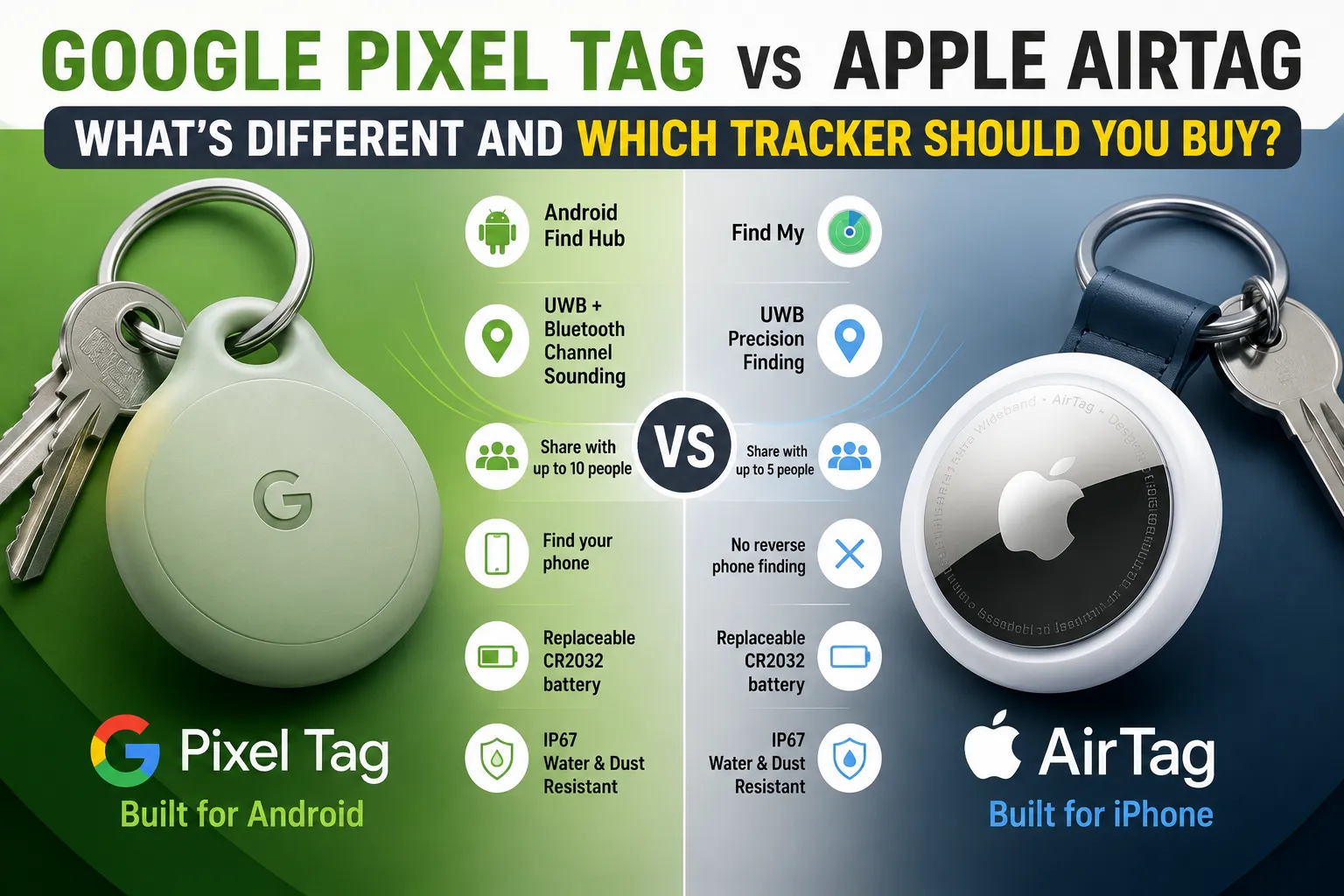
Google Pixel Tag vs Apple AirTag at a Glance
| Feature | Google Pixel Tag | Apple AirTag |
|---|---|---|
| Ecosystem | Android / Google Find Hub | Apple Find My |
| Primary audience | Android users | iPhone and iPad users |
| Precision technology | UWB + Bluetooth Channel Sounding | UWB |
| Network | Google Find Hub | Apple Find My |
| Battery | Replaceable CR2032 | Replaceable CR2032 |
| Expected battery life | More than one year | More than one year |
| Water/dust resistance | IP67 | IP67 |
| Weight | About 11.8–12g | 11.8g |
| Item sharing | Up to 10 people | Up to 5 people |
| Reverse phone finding | Yes | No dedicated equivalent |
| Phone requirements | Android 9+ for basic compatibility; advanced features require newer hardware | iPhone/iPad with supported operating system |
| Best ecosystem | Android | Apple |
Apple’s current-generation AirTag uses Bluetooth, a second-generation Ultra Wideband chip and NFC, while maintaining IP67 resistance and a replaceable CR2032 battery. (Apple)
What Is the Google Pixel Tag?
The Google Pixel Tag is Google’s dedicated item tracker for Android users.
Rather than creating an isolated tracking system, Google is integrating the device with Find Hub, Google’s broader device-finding network. The system can use nearby Android devices to help determine the location of a missing tracker, much like Apple’s Find My network uses nearby Apple devices. (The Verge)
The Pixel Tag is designed for everyday objects such as:
- Keys
- Backpacks
- Luggage
- Wallets
- Bicycles
- Camera bags
- Travel cases
- Personal accessories
Google is also emphasizing more advanced proximity-finding technology. In addition to Ultra Wideband, the Pixel Tag is reported to support Bluetooth Channel Sounding, which can provide precise distance information on compatible hardware. (The Verge)
That gives Google’s tracker an interesting technical advantage on supported Android devices.
What Is the Apple AirTag?
The Apple AirTag is a small Bluetooth tracker that works with Apple’s Find My network.
Once connected to an Apple account, an AirTag appears inside the Find My app. If the tag is nearby, users can make it play a sound and, with compatible Apple hardware, use Precision Finding to determine its direction and approximate distance. (Apple)
If the AirTag is far away, nearby Apple devices can anonymously detect its Bluetooth signal and relay its location to the Find My network. Apple says the network includes more than a billion Apple devices. (Apple)
The current-generation AirTag also features an upgraded speaker and improved Precision Finding range compared with the previous generation. Apple says the Precision Finding range can be up to 1.5 times greater, while the speaker is 50% louder. (Apple)
The Biggest Difference Is the Ecosystem
The most important difference between these trackers isn’t actually the hardware.
It’s the phone you already own.
Pixel Tag for Android Users
The Pixel Tag is built around Google’s Android ecosystem and Find Hub.
That makes it the natural choice for people who use:
- Google Pixel phones
- Android smartphones
- Pixel Watch devices
- Other compatible Android hardware
The tracker is reported to work with Android 9 and newer for basic functionality, while some of its advanced capabilities depend on newer hardware. (Android Central)
AirTag for Apple Users
AirTag is designed primarily for the Apple ecosystem.
It integrates directly with:
- iPhone
- iPad
- Apple Watch
- Find My
- Siri
- Apple’s broader device ecosystem
Apple’s current technical specifications require an Apple Account and an iPhone running iOS 26 or later, or a compatible iPad running iPadOS 26 or later. (Apple Support)
The practical rule is simple:
If you primarily use Android, choose the Pixel Tag. If you primarily use an iPhone, choose AirTag.
Which Tracker Has the Better Finding Network?
The network behind a tracker can matter more than its Bluetooth range.
A Bluetooth tracker doesn’t normally connect directly to the internet. Instead, nearby smartphones and other compatible devices can detect it and anonymously report its location to the relevant network.
Apple’s Find My Network
AirTag benefits from Apple’s enormous Find My network.
Apple says more than a billion Apple devices can participate in locating missing items. The process is designed to be anonymous and encrypted, so participating devices can help locate a lost AirTag without revealing their identities to the owner. (Apple)
This is one of AirTag’s biggest strengths.
Google’s Find Hub Network
Pixel Tag uses Google’s Find Hub network, which is designed to use the enormous installed base of Android devices to help locate lost hardware.
Google’s tracker therefore has the potential to offer a comparable crowdsourced finding experience, particularly in areas with high Android adoption. Reports surrounding the Pixel Tag say Find Hub can draw on more than a billion Android devices. (Android Central)
However, real-world performance will depend heavily on how many compatible devices are participating in the network around the location where an item is lost.
That means network density matters geographically.
Pixel Tag vs AirTag Precision Finding
Precision finding is where these products become much more interesting than simple Bluetooth trackers.
AirTag Precision Finding
AirTag uses Apple’s Ultra Wideband technology to provide directional guidance when the tracker is nearby.
On compatible devices, your iPhone can show information indicating where the AirTag is and how far away it is. The system combines visual, audio and haptic feedback to guide you toward the item. (Apple)
The latest AirTag also offers improved Precision Finding range.
Pixel Tag Precision Finding
Google’s Pixel Tag goes beyond traditional Bluetooth proximity detection by combining Ultra Wideband and Bluetooth Channel Sounding.
Channel Sounding is particularly interesting because it can provide more precise distance information on compatible Bluetooth 6.0 hardware. Google’s tracker also supports UWB-based precision finding on compatible phones. (The Verge)
That could make Pixel Tag especially attractive to users with newer Android hardware.
However, buyers should pay attention to compatibility. Not every Android phone will necessarily support every advanced Pixel Tag feature.
Which Tracker Has Better Battery Life?
Neither device requires a proprietary rechargeable battery.
Both use a replaceable CR2032 coin-cell battery, making long-term ownership relatively straightforward.
The Pixel Tag is reported to offer more than a year of battery life, while Apple says the current AirTag can operate for more than a year before its battery needs replacement. (The Verge)
This is an important advantage over rechargeable trackers because you don’t have to remember to charge the tracker regularly.
For luggage or emergency-use trackers, a replaceable battery is particularly convenient.
Which Tracker Is More Durable?
There isn’t a major difference here.
Both trackers have an IP67 rating.
That means they are designed to withstand dust and temporary immersion in water under specified laboratory conditions.
The current AirTag measures 31.9mm in diameter, is 8mm thick and weighs 11.8 grams. (Apple Support)
The Pixel Tag is reported to weigh approximately 11.8–12 grams and also carries an IP67 rating. (The Verge)
For everyday use, both should be suitable for keys, bags and luggage.
Pixel Tag Has an Interesting Phone-Finding Feature
One of the more unusual Pixel Tag features is its ability to help locate your phone.
The tracker reportedly includes a physical button that can trigger your paired phone to ring. (The Verge)
This creates a useful two-way relationship:
Phone → find your keys
Pixel Tag → find your phone
AirTag doesn’t offer an equivalent dedicated physical button for ringing your iPhone.
That makes Pixel Tag potentially more useful for people who frequently misplace both their belongings and their smartphone.
Which Tracker Offers Better Item Sharing?
Sharing is becoming increasingly important for household items.
A family may want several people to locate the same set of keys, a shared vehicle, a suitcase or another commonly used item.
The Pixel Tag is reported to support sharing with up to 10 people. (Tom’s Guide)
Apple’s current AirTag supports sharing with up to five people. (Apple)
For a household with many people sharing an item, Pixel Tag therefore has an advantage on paper.
Privacy and Unwanted Tracking
A tracker should never be evaluated solely on its ability to find lost belongings.
Privacy and anti-stalking protections are equally important.
AirTag includes several features designed to discourage unwanted tracking. Apple says an iPhone or Android phone can alert a person when an unknown AirTag appears to be traveling with them, while the AirTag can also emit a sound when separated from its owner under certain circumstances. (Apple)
Apple also says location information associated with the Find My network is encrypted and that participating devices remain anonymous. (Apple)
Google’s approach similarly places emphasis on unwanted-tracking protections through Android’s broader tracker-detection system.
For buyers, this is an area worth checking carefully before purchasing any Bluetooth tracker, particularly if the device will be carried around by multiple people.
Which Tracker Is Better for Travel?
Both can be useful for travel, but the best choice depends heavily on your phone.
AirTag for iPhone Travelers
AirTag is particularly attractive for travelers who use iPhones because the Find My network can help locate lost luggage or other tagged belongings.
Apple also provides a feature for sharing the location of a lost AirTag with third parties during recovery, including support involving more than 50 airlines. (Apple)
For international travelers, the size of the Find My network is a major advantage.
Pixel Tag for Android Travelers
Pixel Tag aims to provide a similar experience for Android users through Find Hub.
If you travel with a Pixel or another compatible Android phone, having the tracker integrated into Google’s ecosystem eliminates the need to use an Apple device simply to track your luggage.
For Android households, that makes Pixel Tag the more logical choice.
Pixel Tag vs AirTag: Pros and Cons
Google Pixel Tag Pros
- Designed specifically for Android users
- Integrated with Google Find Hub
- Supports UWB precision finding
- Adds Bluetooth Channel Sounding on compatible hardware
- Replaceable CR2032 battery
- More than one year of reported battery life
- IP67 protection
- Physical button can help locate a paired phone
- Supports sharing with up to 10 people
Google Pixel Tag Cons
- Advanced features require compatible Android hardware
- The effectiveness of Find Hub depends on participating Android devices nearby
- Attachment may require an accessory because the tracker reportedly lacks a built-in keyring hole
- Availability and final regional pricing may vary as the product rolls out (The Verge)
Apple AirTag Pros
- Deep integration with Find My
- Extremely large crowdsourced finding network
- Strong Precision Finding experience
- Replaceable CR2032 battery
- More than one year of battery life
- IP67 water and dust resistance
- Improved speaker on the latest generation
- Strong privacy and unwanted-tracking protections
- Works with Apple’s broader ecosystem (Apple)
Apple AirTag Cons
- Best experience is tied to Apple hardware
- Advanced Precision Finding requires compatible Apple devices
- No dedicated button for reverse phone finding
- Sharing supports fewer people than the reported Pixel Tag limit
- A separate accessory is generally needed for convenient keyring attachment
Which Tracker Should You Buy?
The answer largely comes down to your ecosystem.
Buy the Google Pixel Tag If…
The Pixel Tag makes the most sense if you:
- Use an Android phone
- Own a Google Pixel device
- Already use Google’s Find Hub
- Want advanced Android-based proximity finding
- Like the idea of being able to ring your phone from the tracker
- Need to share an item with a larger group
- Prefer Google’s ecosystem
Its combination of UWB and Bluetooth Channel Sounding could also make it particularly interesting for users with newer compatible Android hardware. (The Verge)
Buy the Apple AirTag If…
AirTag is the better choice if you:
- Use an iPhone
- Own an Apple Watch or other Apple devices
- Already rely on Find My
- Want access to Apple’s extensive crowdsourced finding network
- Frequently travel with luggage
- Want Apple’s mature Precision Finding experience
- Prefer deep integration with Siri and Apple’s ecosystem
Apple’s current AirTag generation also benefits from improved range and a louder speaker, making it easier to locate nearby items. (Apple)
Google Pixel Tag vs AirTag: Which One Wins?
There isn’t one universal winner.
AirTag remains the obvious choice for iPhone users, largely because its strength comes from the combination of Find My, Precision Finding and Apple’s enormous device network.
Pixel Tag is the more compelling option for Android users, particularly those invested in Google’s ecosystem. Its support for UWB and Bluetooth Channel Sounding, reverse phone finding and broader item sharing could give it several practical advantages.
The more important question isn’t simply which tracker has the better specifications.
It’s which tracking network your phone already belongs to.
If you use an iPhone, AirTag fits naturally into your existing setup. If you use Android, Pixel Tag is designed to provide the equivalent experience without forcing you into Apple’s ecosystem.
The Smartest Tracker Is the One That Matches Your Phone
Bluetooth trackers work best when their hardware, software and crowdsourced network work together. That’s why choosing between Pixel Tag and AirTag isn’t quite like choosing between two ordinary accessories.
For Apple households, AirTag remains deeply integrated and difficult to beat. For Android households, Google’s Pixel Tag could finally provide a first-party alternative built around the same ecosystem people already use every day.
As Pixel Tag reaches the market, the real test will be how Google’s Find Hub network performs in everyday conditions across different cities and countries. That real-world network density—not just specifications on a product sheet—could ultimately determine whether Pixel Tag becomes a true AirTag rival.