How Source Code Becomes Executable Software
Every application begins with instructions written by people.
Whether it is a mobile app, a web browser, a video game or a business platform, software starts as source code created by programmers. But computers do not simply take that human-written code and automatically understand everything it says.
Before software can run, source code must be processed into a form that the computer’s processor and operating environment can execute.
That transformation can involve several stages, including preprocessing, compilation, interpretation, linking, packaging and runtime execution. The exact process depends on the programming language, development environment and platform being used.
Understanding how source code becomes executable software provides a clearer picture of what happens between writing a program and clicking its application icon.
What Is Source Code?
Source code is the human-readable set of instructions that programmers write to create software.
It can contain:
- Instructions
- Variables
- Functions
- Classes
- Data structures
- Conditions
- Loops
- Comments
- Configuration information
- References to libraries and other software components
For example, a programmer might write a simple instruction that tells a program to display a message.
The source code expresses the programmer’s intended behavior in a programming language that humans can reasonably read and understand.
However, the processor inside a computer does not normally execute languages such as Python, Java, C++ or JavaScript directly in their original source-code form.
The source code therefore needs to be transformed or processed before the desired operations can take place.
For a broader introduction, see What Is Programming and How Does It Work?.
Programming Languages Provide the Instructions
Source code must be written using rules defined by a programming language.
Programming languages provide syntax and semantics that allow developers to express instructions and algorithms.
Some widely used languages include:
- C
- C++
- C#
- Java
- JavaScript
- Python
- Go
- Rust
- Swift
- Kotlin
Each language has its own characteristics and execution model.
Some languages are commonly compiled into native machine code. Others are typically interpreted or executed through a virtual machine. Some use a combination of compilation and runtime processing.
What Are Programming Languages and How Do Different Languages Work? provides a deeper explanation of how programming languages translate human instructions into operations computers can perform.
The First Step: Writing and Organizing the Code
The process begins in a development environment.
A programmer writes source files using a code editor or integrated development environment, commonly called an IDE.
A software project might contain hundreds or even millions of lines of code distributed across many files.
Those files can define:
- Application logic
- User interfaces
- Database operations
- Network communication
- Security controls
- Configuration
- Tests
- Data processing
- External integrations
The source code is normally organized into modules, packages or other logical components.
Large projects are rarely built from one enormous source file.
Instead, developers structure software into manageable pieces that can be developed, tested and maintained independently.
Source Code Is Checked for Errors
Before software can be successfully built, the development tools need to identify problems in the source code.
Some errors are detected before the program runs.
These may include:
- Missing punctuation
- Invalid syntax
- Incorrect variable declarations
- Undefined functions
- Type mismatches
- Invalid language constructs
The exact errors depend on the programming language.
A compiler or other development tool analyzes the source code according to the language’s rules.
If the code contains an error that prevents compilation or translation, the process may stop until the developer fixes it.
This is one reason modern development environments provide features such as syntax highlighting, code completion and real-time error detection.
What Is a Compiler?
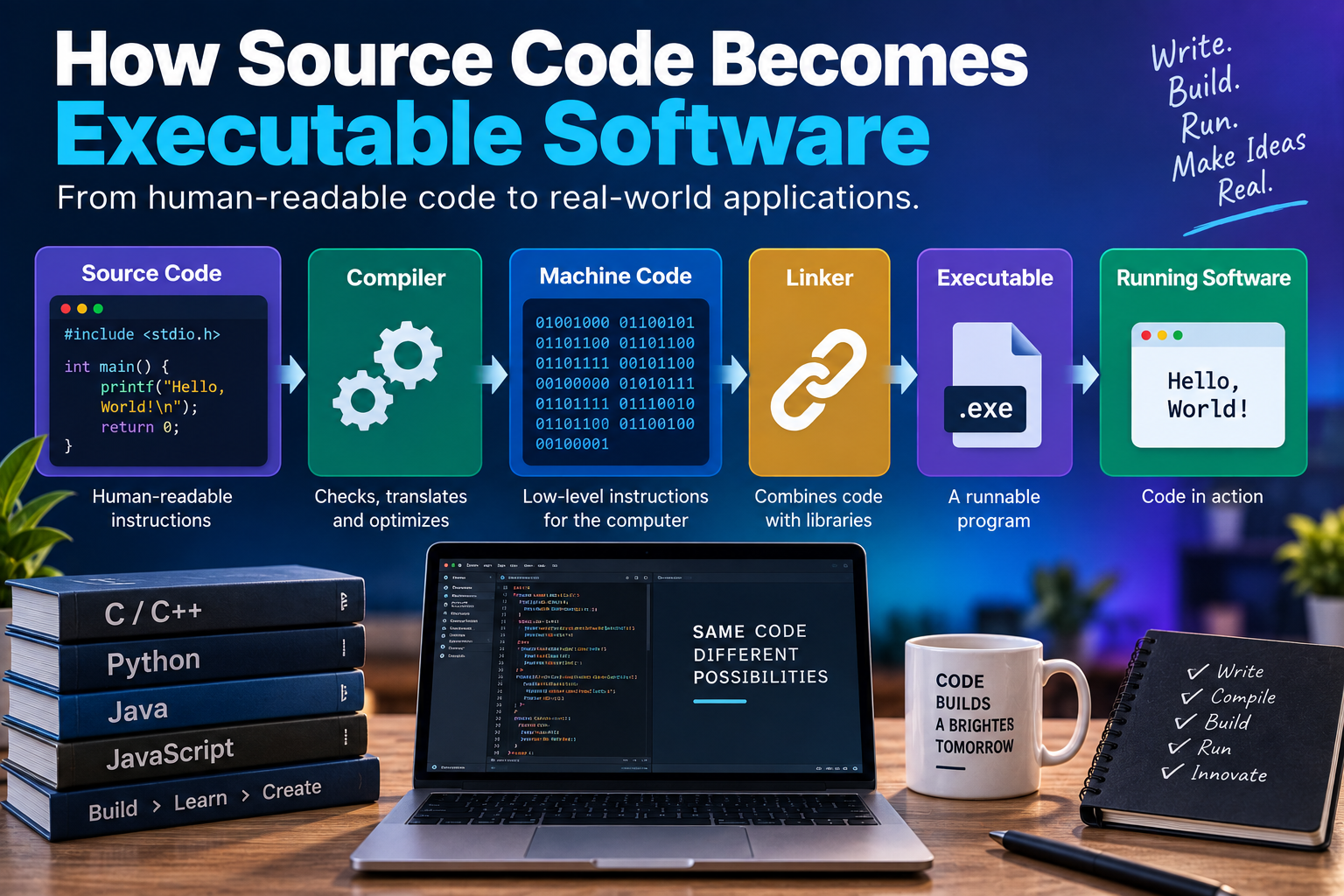
A compiler is software that translates source code into another form that can eventually be executed.
In many compiled languages, the compiler translates source code into machine code or an intermediate representation.
The resulting output can then be processed further before becoming a runnable program.
A compiler typically performs several types of work.
It may:
- Read the source code.
- Analyze its structure.
- Check language rules.
- Identify variables and functions.
- Optimize certain operations.
- Translate instructions into a lower-level representation.
- Generate output for later stages.
The compiler is therefore an important bridge between human-readable programming languages and lower-level instructions.
Source Code May Go Through Multiple Representations
Software does not always jump directly from source code to machine instructions.
There can be several intermediate stages.
A simplified model might look like this:
Source code → Tokens → Syntax tree → Intermediate representation → Machine code
Not every language uses exactly this sequence, but the concept is useful.
Tokens
The compiler may first break source code into meaningful elements called tokens.
These can include:
- Keywords
- Identifiers
- Operators
- Numbers
- Strings
- Symbols
Syntax Tree
The compiler can then analyze how those elements are organized.
A syntax tree represents the structure and relationships within the program.
For example, it can represent which expressions belong inside a function and how different operations relate to one another.
Intermediate Representation
Many compilers convert the program into an intermediate representation.
This provides a form that compiler tools can analyze and optimize before producing the final target code.
What Is Machine Code?
Machine code consists of instructions represented in a form that a particular processor architecture can execute.
Processors operate at a very low level compared with human-readable source code.
Different processor architectures have different instruction sets.
For example, software targeting an x86-64 processor may ultimately contain machine instructions designed for that architecture, while software targeting ARM processors may use a different instruction set.
This is one reason software often needs different builds for different hardware platforms.
A program compiled for one architecture may not run directly on another architecture unless an appropriate compatibility layer, virtual machine or translation mechanism is available.
Assembly Language Sits Close to Machine Code
Assembly language provides a human-readable representation of low-level processor instructions.
It is much closer to machine code than high-level languages such as Python or Java.
A compiler targeting a particular processor may generate assembly instructions before another tool converts them into machine code.
The relationship can be simplified as:
High-level source code → Assembly or intermediate representation → Machine code
Modern compilers can perform much of this process automatically.
Developers working at the application level generally do not need to manually write assembly instructions.
The Role of the Linker
Compilation is not necessarily the final stage.
Most useful software depends on other pieces of code.
For example, an application might use:
- Standard libraries
- Mathematical libraries
- Graphics libraries
- Networking libraries
- Operating-system functions
- Third-party packages
A linker helps combine compiled pieces into a form that can be used by the final program.
It can resolve references between different compiled modules and connect the application with required libraries.
Imagine one source file calls a function defined somewhere else.
During compilation, the compiler can understand that the function exists, but another stage may need to connect the reference to the actual implementation.
The linker helps perform this job.
Static and Dynamic Linking
Libraries can be incorporated into software in different ways.
Static Linking
With static linking, required library code can be incorporated into the executable during the build process.
This can produce a more self-contained executable, although it may also increase its size.
Dynamic Linking
With dynamic linking, an application can depend on shared libraries that are loaded separately.
This can allow multiple applications to share the same library.
The exact mechanisms vary across operating systems.
Windows, Linux and macOS use different approaches to managing executable files and shared libraries.
What Happens During the Build Process?
The collection of steps that transforms source code into distributable software is commonly called the build process.
A simplified build pipeline might look like this:
Source Code
↓
Preprocessing
↓
Compilation
↓
Object Files
↓
Linking
↓
Executable
↓
Packaging
↓
Distribution
Modern projects can involve considerably more steps.
A build system may also:
- Run automated tests
- Check code quality
- Generate documentation
- Bundle assets
- Minify files
- Create installation packages
- Generate platform-specific builds
- Sign software
- Produce release artifacts
The entire process can be automated through development tools and continuous integration systems.
What Are Object Files?
In many compiled languages, the compiler produces object files before the final executable is created.
An object file contains compiled machine-level code and other information required for later stages.
It may not be directly executable on its own.
A large application could produce many object files:
main.obj
database.obj
network.obj
interface.obj
security.obj
The linker can combine these pieces and resolve their relationships to create the final executable or library.
The exact file extensions depend on the platform and toolchain.
Not All Software Is Compiled Directly to Machine Code
The idea that every programming language simply gets converted into native machine code is an oversimplification.
Different languages use different execution strategies.
Some are traditionally compiled ahead of time.
Others are interpreted.
Some are compiled into an intermediate format that is executed by a runtime environment.
Others can use just-in-time compilation.
These approaches can also be combined.
How Interpreted Languages Work
An interpreter executes instructions from a program through a runtime environment rather than requiring the entire source program to become a traditional native executable beforehand.
Python is a common example of a language associated with an interpreter-based execution model.
A simplified process is:
Source code → Interpreter → Runtime operations
The interpreter reads the program and performs the operations represented by the code.
Modern implementations can use additional techniques, including bytecode and runtime optimization, so the simple description of “reading source code line by line” does not accurately describe every interpreter.
What Is Bytecode?
Some languages compile source code into an intermediate form commonly called bytecode.
The bytecode is not necessarily native machine code for the computer’s processor.
Instead, it is designed to be executed by a runtime environment.
Java is a well-known example.
A simplified process is:
Java source code → Bytecode → Java Virtual Machine → Processor
This approach can provide portability because the same bytecode can potentially run on different operating systems and processor architectures as long as a compatible runtime environment exists.
The Java Virtual Machine
The Java Virtual Machine, or JVM, provides an execution environment for Java bytecode.
The JVM can interpret bytecode and can also use just-in-time compilation to convert frequently executed portions into native machine instructions while the program is running.
This demonstrates an important principle in software development:
Compilation and interpretation are not always mutually exclusive.
Modern runtimes can combine several techniques to balance portability, startup performance and execution speed.
Just-in-Time Compilation
Just-in-time, or JIT, compilation occurs during program execution.
Instead of compiling everything into native machine code before the program starts, a runtime can identify code that is being used frequently and compile it into optimized machine instructions.
This can allow the runtime to optimize software based on information available during actual execution.
JIT compilation is used in several modern runtime environments and programming ecosystems.
What Happens When You Run an Executable?
Once software has been built, the operating system can launch it.
The process usually involves several steps.
First, the operating system identifies the executable and determines how it should be loaded.
It then creates a process and establishes the resources the application needs.
These resources can include:
- Memory
- Processor time
- File access
- Network access
- Security permissions
- System libraries
- Input and output devices
The operating system manages these resources while the application runs.
Loading the Program Into Memory
Executable software is stored on persistent storage such as an SSD or hard drive.
The processor cannot simply execute the program while it remains stored there.
The operating system loads the necessary portions of the program into memory.
The processor can then fetch instructions from memory and execute them.
The operating system may also use virtual memory and other mechanisms to manage how programs access memory.
The CPU Executes Instructions
At the lowest level, the processor repeatedly performs operations associated with executing machine instructions.
A simplified description involves:
- Fetching an instruction.
- Decoding it.
- Performing the required operation.
- Storing or using the resulting information.
- Moving to the next instruction.
Modern processors are far more sophisticated than this simple model suggests.
They use techniques such as caching, pipelining, branch prediction and out-of-order execution to improve performance.
Nevertheless, the fundamental concept remains: executable software ultimately results in processor instructions being carried out.
The Operating System Is an Important Intermediary
Applications generally do not control computer hardware directly.
Instead, they interact with the operating system through interfaces such as system calls and APIs.
For example, an application might need to:
- Open a file
- Create a network connection
- Display a window
- Access a camera
- Allocate memory
- Play audio
The operating system provides mechanisms through which software can request these services.
This creates a useful separation between applications and hardware.
A developer can write software that uses operating-system APIs without needing to manually control every electrical operation performed by the computer.
What Happens With Web Applications?
Web applications follow a somewhat different path.
A web developer may write:
- HTML
- CSS
- JavaScript
- Server-side code
- Database queries
- Configuration files
When a user visits a website, the browser receives resources from a server and processes them.
The browser interprets HTML to construct the page structure, applies CSS for presentation and executes JavaScript when necessary.
Server-side software may also run on remote computers and communicate with databases and other services.
This means a modern web application can involve multiple execution environments simultaneously.
Mobile Applications Have Their Own Build Processes
Mobile applications also go through platform-specific build processes.
Android applications and iOS applications use different development ecosystems, packaging formats and runtime environments.
A developer may write source code using languages such as Kotlin, Java, Swift or other supported technologies.
The development tools then compile, package and prepare the application for installation and distribution.
The resulting application must meet platform requirements before it can be distributed through an app store or another channel.
Why Software Needs to Be Built for Different Platforms
A program designed for Windows cannot necessarily run directly on macOS or Linux.
The reasons include differences in:
- Processor architectures
- Operating-system APIs
- File systems
- Libraries
- Application frameworks
- Executable formats
- Security models
Developers can address these differences in several ways.
They may create separate builds for each platform, use cross-platform frameworks or rely on virtual machines and compatibility layers.
The choice depends on the application’s requirements.
Packaging Turns Software Into Something Users Can Install
After compilation and linking, software may still need to be packaged.
Packaging combines the files needed for distribution into an appropriate format.
A package might contain:
- Executable files
- Libraries
- Images
- Fonts
- Configuration files
- Metadata
- Installation instructions
- Digital signatures
The package allows the operating system or application store to install the software in a predictable way.
Testing Happens Throughout the Process
Software is not simply written, compiled and released.
Testing is an important part of development.
Developers may perform:
- Unit testing
- Integration testing
- System testing
- Performance testing
- Security testing
- Compatibility testing
- User interface testing
Testing can identify problems before software reaches users.
Modern development processes frequently automate many of these tests so they can be run whenever new code is added.
For a broader view of how software moves from an idea to a finished product, see the Complete Guide to Software Development Processes.
Optimization Can Change the Final Program
Compilers can optimize code to improve performance, reduce memory usage or decrease executable size.
For example, an optimizer may identify calculations that can be simplified or remove code that is never used.
Optimization can occur at multiple levels.
Developers may optimize the source code itself, while compiler tools can perform additional transformations automatically.
The final machine code can therefore look very different from the original source code while producing the same intended result.
Debug and Release Builds Can Differ
Developers often create different versions of an application during development.
A debug build may contain additional information that helps programmers investigate problems.
A release build is generally optimized and prepared for distribution.
Debugging information can help developers identify where a problem occurred in the original source code.
Without appropriate debugging information, investigating a problem in compiled machine code can be substantially more difficult.
Source Code and Executable Software Are Not the Same Thing
It is important to distinguish between source code and the final executable.
Source code expresses the program in a human-oriented programming language.
An executable contains instructions and supporting information prepared for execution on a particular platform or runtime.
The two can be related without looking anything alike.
A relatively short source-code function could result in numerous machine instructions after compilation, optimization and linking.
Likewise, a single executable may contain code originating from many different source files and libraries.
Software Development Does Not End With Compilation
Creating an executable is only one stage of the software lifecycle.
After software is released, developers may need to:
- Fix bugs
- Patch security vulnerabilities
- Add features
- Improve performance
- Update dependencies
- Support new operating systems
- Adapt to new hardware
- Respond to user feedback
Modern software is therefore continuously developed rather than being a one-time product.
The build process is repeated whenever developers produce new versions.
A Simple View of the Entire Journey
The entire transformation can be summarized as:
Programmer writes source code
↓
Development tools analyze the code
↓
Compiler or interpreter processes it
↓
Code may be converted into an intermediate representation
↓
Compiler generates lower-level instructions
↓
Linker combines required components
↓
Executable or package is produced
↓
Operating system loads the software
↓
Runtime and system libraries provide required services
↓
CPU executes machine instructions
↓
The software performs its intended tasks
Real-world software can involve considerably more steps, but this model captures the fundamental journey.
Modern Software Uses Multiple Layers
Today’s applications rarely operate as isolated executable files.
A typical application can depend on several layers:
Application code
The functionality created by developers.
Libraries and frameworks
Reusable components that provide additional capabilities.
Runtime environment
Software that helps execute the application.
Operating system
The layer that manages hardware and system resources.
Hardware
The physical processor, memory, storage and other devices.
These layers work together to turn source code into something users can interact with.
For a broader explanation of this layered approach, see How Modern Software Works.
Why Understanding the Process Matters
Knowing how source code becomes executable software is useful even for people who are not professional programmers.
It explains why applications need different versions for different platforms, why software updates are necessary and why development tools can detect certain errors before a program is launched.
It also demonstrates why software development involves much more than simply writing code.
Developers need to understand languages, compilers, libraries, operating systems, testing, packaging, security and deployment.
Each stage contributes to turning an idea into functioning software.
From Human Instructions to Machine Operations
The journey from source code to executable software is a remarkable example of abstraction.
A developer can describe complex behavior using a programming language designed for humans. Development tools then analyze and transform those instructions through several increasingly lower-level representations until the computer can ultimately execute them.
What begins as readable source code can become machine instructions operating at the processor level, while libraries, runtimes and operating systems provide the layers needed to turn those instructions into a usable application.
That process happens every time developers build software, whether the result is a small utility, a smartphone app or a massive platform serving millions of users. Understanding what happens between those two endpoints makes the technology behind modern software far less mysterious.