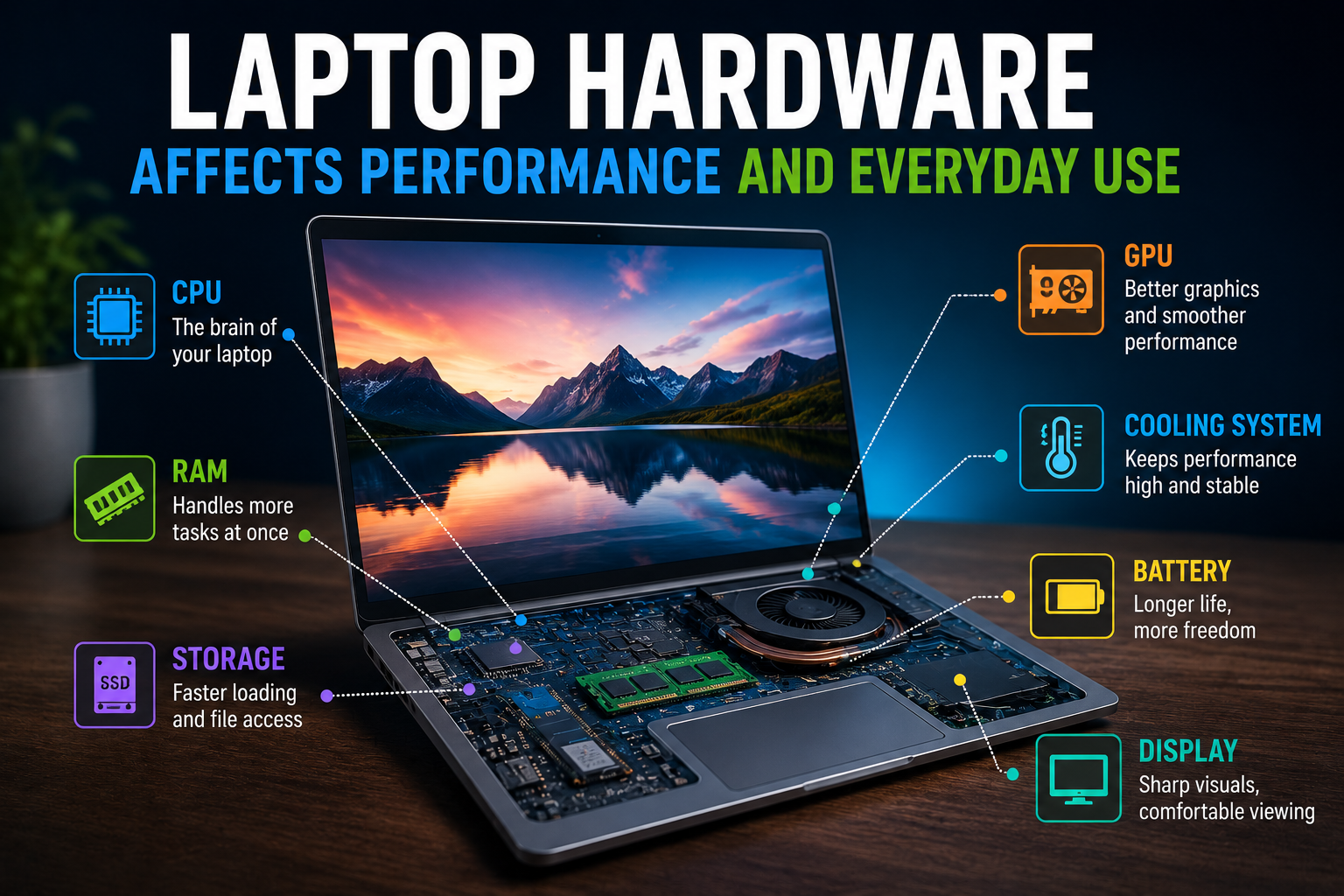
How Laptop Hardware Affects Performance and Everyday Use
A laptop can look impressive on a store shelf, but its real-world performance depends on what is happening inside the chassis.
The processor, memory, storage, graphics hardware, display, battery and cooling system all influence how a laptop behaves during everyday use. Two machines that appear similar on paper can feel very different when browsing the web, editing documents, running applications, playing games or working with large files.
Understanding how laptop hardware affects performance makes it easier to choose a computer that fits actual needs rather than simply buying the model with the most expensive specifications. For a broader look at how different devices fit into the modern technology landscape, see this guide to what consumer gadgets are and how modern gadgets work.
The Processor Is the Laptop’s Main Computing Engine
The central processing unit, or CPU, performs many of the calculations required to run applications and the operating system.
A modern processor contains multiple cores that can handle different tasks simultaneously. Clock speed, processor architecture, core count and power efficiency can all influence performance.
For everyday activities such as browsing, email, document editing and video streaming, a modern midrange processor is often more than sufficient.
More demanding workloads can benefit from additional processing capability.
These include:
- Video editing
- 3D rendering
- Software development
- Large data analysis
- Professional photo processing
- Complex simulations
- Certain artificial-intelligence workloads
However, a processor with more cores is not automatically faster for every task. Software needs to be designed to take advantage of additional cores.
This is why processor performance should be considered in relation to the applications a person actually uses.
RAM Determines How Much Work the Laptop Can Handle at Once
Random access memory, commonly called RAM, provides temporary working space for applications and the operating system.
When several programs are open simultaneously, they compete for available memory.
A laptop with sufficient RAM can keep more applications and browser tabs active without constantly moving information between RAM and storage.
A machine with limited memory may become noticeably slower when multitasking.
For example, someone might have a browser with numerous tabs open while running a spreadsheet, video call and messaging application. If the laptop does not have enough RAM, performance can deteriorate as the operating system begins relying more heavily on storage.
For many modern users, 16GB of RAM is a comfortable starting point, while heavier workloads may justify 32GB or more.
The appropriate amount depends on the operating system, applications and expected workload.
Storage Affects Startup and Application Responsiveness
Storage technology has a major effect on how quickly a laptop feels.
Modern laptops increasingly use solid-state drives, or SSDs, rather than traditional mechanical hard drives.
SSDs have no spinning platters or moving read/write heads. They can access data much more quickly, which can make a computer feel significantly more responsive.
An SSD can improve:
- Operating-system startup
- Application loading
- File transfers
- Search operations
- Large-project workflows
- File access
The difference is particularly noticeable when upgrading from an older mechanical hard drive.
Storage capacity matters too.
A laptop with a fast SSD but very little free space can become inconvenient as files, applications and system data accumulate.
For many users, 512GB provides a useful balance, while people working with large video libraries, games or professional files may need 1TB or more.
Graphics Hardware Matters Beyond Gaming
The graphics processing unit, or GPU, is responsible for rendering images and handling certain types of parallel calculations.
Laptop graphics can generally be divided into integrated and dedicated solutions.
Integrated graphics are built into or closely associated with the processor and typically share system memory. They are often sufficient for office work, browsing, video playback and many lightweight creative tasks.
Dedicated GPUs have their own graphics memory and are designed for heavier graphical workloads.
They can make a significant difference for:
- Modern PC gaming
- 3D design
- Video editing
- Animation
- CAD applications
- Machine-learning workloads
- High-resolution creative work
A dedicated GPU also consumes more power and can generate additional heat, so users need to consider battery life and laptop size when choosing one.
Cooling Can Determine Sustained Performance
Laptop components generate heat when they work hard.
The cooling system is responsible for moving that heat away from the CPU, GPU and other components.
A laptop may perform extremely well for a short period but reduce processor speeds if temperatures become too high.
This process is commonly known as thermal throttling.
Cooling design therefore matters particularly for demanding workloads.
A thicker laptop may have more room for fans, heat pipes and larger cooling components. A very thin machine may prioritize portability at the expense of sustained performance under heavy workloads.
This is one reason why comparing processor specifications alone does not always reveal how a laptop will perform in practice.
Battery Capacity Shapes Mobility
Laptop performance is only part of the experience.
Battery capacity determines how long a computer can operate away from a power outlet, although battery life depends on far more than the battery’s rated capacity.
Factors include:
- Processor efficiency
- Display brightness
- Screen resolution
- Refresh rate
- Wireless connectivity
- Background applications
- GPU activity
- Battery capacity
- Operating-system power management
A powerful gaming laptop can have a large battery and still provide shorter battery life than a lightweight productivity laptop because its components consume substantially more energy.
For people who travel frequently, efficiency can therefore be more important than peak performance.
The Display Affects Everyday Comfort
The screen is one of the components users interact with most.
Display specifications include resolution, refresh rate, brightness, color accuracy, panel technology and size.
A higher-resolution display can make text and images appear sharper, while a higher refresh rate can make scrolling and animations appear smoother.
For creative professionals, color accuracy can be particularly important.
For gamers, refresh rate and response time may matter more.
For office workers, brightness, text clarity and comfortable viewing can have a greater effect on the everyday experience.
A technically powerful laptop with an uncomfortable display can still be a poor choice for someone who spends many hours looking at the screen.
Keyboard and Trackpad Influence Productivity
Performance is not only about processor benchmarks.
The keyboard and trackpad directly affect how efficiently users interact with a laptop.
A comfortable keyboard can make a substantial difference for people who write, program or work with documents throughout the day.
Trackpad size, accuracy and gesture support also influence navigation.
These features are sometimes overlooked when people compare specifications, but they can have more practical importance than small differences in processor performance.
Ports Determine How Easily a Laptop Connects to Other Devices
Ports may not affect processing speed, but they can significantly influence everyday convenience.
Depending on the model, a laptop may include:
- USB-A
- USB-C
- Thunderbolt or similar high-speed connections
- HDMI
- Headphone jacks
- Ethernet
- SD or microSD card readers
A photographer may value an integrated memory-card reader. A professional using multiple monitors may need high-speed display connectivity.
Someone who works primarily in the cloud may need fewer physical connections.
The number and type of ports can therefore affect whether users need adapters or docking stations.
Wireless Connectivity Matters for Modern Work
Wi-Fi and Bluetooth are now essential parts of the laptop experience.
Newer wireless standards can improve connection speeds, reliability and performance under suitable network conditions. For a deeper explanation of the technologies that make these connections possible, see this Complete Guide to Wireless Connectivity.
Bluetooth is useful for wireless headphones, mice, keyboards, controllers and other accessories.
A laptop’s networking hardware can become particularly important for remote workers who depend on stable internet connections for video meetings, cloud applications and file synchronization.
However, actual internet performance also depends heavily on the router, network congestion and internet service provider.
The Motherboard Connects the Major Components
The motherboard provides the physical and electrical connections between many of the laptop’s components.
It allows the processor, memory, storage, networking hardware, ports and other components to communicate.
Laptop motherboards are highly integrated because manufacturers need to fit substantial computing capability into a compact space.
This integration can make laptops smaller and more efficient, but it can also make repairs and upgrades more difficult than on desktop computers.
Upgradeability Can Extend a Laptop’s Useful Life
Not every laptop allows users to upgrade components.
Some models permit storage upgrades or additional memory. Others have memory permanently attached to the motherboard.
Upgradeability can affect long-term value.
A laptop with replaceable storage and memory may be easier to adapt as computing needs increase.
For example, a user might initially purchase a machine with moderate storage and later install a larger SSD.
A laptop with non-upgradeable components requires more careful planning at the time of purchase.
Build Quality Affects Durability
A laptop’s external construction influences more than appearance.
Materials, hinges, chassis design and internal reinforcement can affect how well a machine handles years of regular use.
People who travel frequently may benefit from a robust chassis designed to withstand movement and occasional impacts.
A laptop that remains mostly on a desk may not require the same level of ruggedness.
Durability is particularly important because replacing a computer after a short period can outweigh the initial savings from buying a cheaper model.
Weight and Size Change How a Laptop Feels
Portability is one of the main advantages of laptops over desktop computers.
A lightweight machine can be easier to carry between home, school, work and travel locations.
Larger laptops may provide benefits such as:
- Bigger screens
- More powerful cooling
- Larger keyboards
- More ports
- Larger batteries
- Dedicated graphics
Smaller laptops tend to emphasize portability and efficiency.
There is no universally ideal size. The right balance depends on how frequently the computer needs to be moved.
Power Efficiency Is Becoming More Important
Modern laptop processors increasingly focus on efficiency as well as raw performance.
Efficient hardware can provide strong performance without consuming excessive power.
This can result in longer battery life, lower heat output and quieter operation.
For everyday users, these characteristics can be more valuable than achieving the highest possible benchmark score.
A laptop that remains cool, quiet and responsive throughout a workday can be more useful than a much faster machine that requires frequent charging.
For more information about how the software layer interacts with hardware resources, see The Complete Guide to Operating Systems.
Hardware Works as a System
One of the most important principles when evaluating laptops is that individual components do not operate independently.
A fast processor paired with insufficient RAM can still struggle with heavy multitasking.
A powerful GPU may be limited by cooling.
A high-resolution display can increase power consumption.
A large SSD provides plenty of storage but does not compensate for a weak processor in demanding applications.
This is why laptop performance is better understood as the result of the entire system working together.
Everyday Users Have Different Hardware Priorities
There is no single laptop specification that makes sense for everyone.
A student who mainly uses a browser, word processor and video-conferencing software may prioritize battery life, portability and keyboard quality.
A business professional may value security features, reliability and connectivity.
A creative professional may need a high-quality display, substantial RAM and a powerful GPU.
A gamer may prioritize graphics performance, cooling and a high-refresh-rate display.
A developer may want a fast processor, plenty of RAM and a comfortable keyboard.
The best hardware configuration is therefore determined by workload rather than marketing labels.
For shoppers comparing complete systems rather than individual specifications, How to Choose the Right Technology Devices provides a broader framework for evaluating technology purchases.
Benchmark Scores Are Useful but Not Everything
Laptop benchmarks can help compare processors, graphics chips and storage devices under controlled conditions.
They are useful for understanding relative performance.
But benchmark results do not perfectly predict how a laptop will feel during everyday use.
Two machines with similar processor scores can differ in keyboard quality, display performance, fan noise, battery life and software optimization.
Real-world workloads also vary.
A laptop optimized for gaming may not be the best choice for long writing sessions or frequent travel.
Benchmarks should therefore be treated as one piece of the buying decision rather than the entire decision.
Hardware Can Shape Software Experience
The operating system and applications depend on the available hardware.
A well-balanced system can make applications launch quickly, switch between tasks smoothly and respond promptly to user commands.
When hardware resources become constrained, software performance can suffer.
This is particularly noticeable when users run demanding applications, open many programs simultaneously or work with large files.
Over time, newer software can also demand more processing power and memory.
A laptop that feels fast when new may eventually feel less responsive if its hardware falls behind the requirements of modern applications.
Choosing Hardware for the Years Ahead
Laptop buyers should consider not only what they need today but also what they are likely to need several years from now.
A little additional RAM or storage capacity can provide useful breathing room.
However, buying dramatically more powerful hardware than necessary can also waste money, increase weight and reduce battery life.
A sensible approach is to identify the applications and workloads that matter most and then choose hardware that comfortably handles them.
For many users, a balanced laptop with a modern processor, adequate RAM, an SSD, a good display and strong battery efficiency will provide a better experience than a machine optimized around one extreme specification.
The Right Hardware Makes Technology Feel Effortless
Laptop performance is the result of many components working together.
The CPU determines how quickly many general tasks can be processed. RAM affects multitasking. SSDs improve responsiveness and file access. GPUs handle graphics and specialized workloads. Cooling determines how long demanding hardware can maintain its performance. The battery, display, keyboard, ports and wireless hardware shape how convenient the computer is to use every day.
The most important lesson is that better hardware does not simply mean higher numbers.
A laptop is useful when its hardware matches the way its owner works, studies, creates or entertains themselves. For someone who travels frequently, low weight and long battery life may matter more than raw processing power. For a creative professional, display quality and graphics performance could be essential. For an office worker, a comfortable keyboard and responsive everyday performance may matter most.
Choosing hardware with those priorities in mind can make a laptop faster, more comfortable and more useful—not just when it is new, but throughout its working life.