How Tablets and E-Readers Work: Displays, Processors, Batteries, Storage and Software
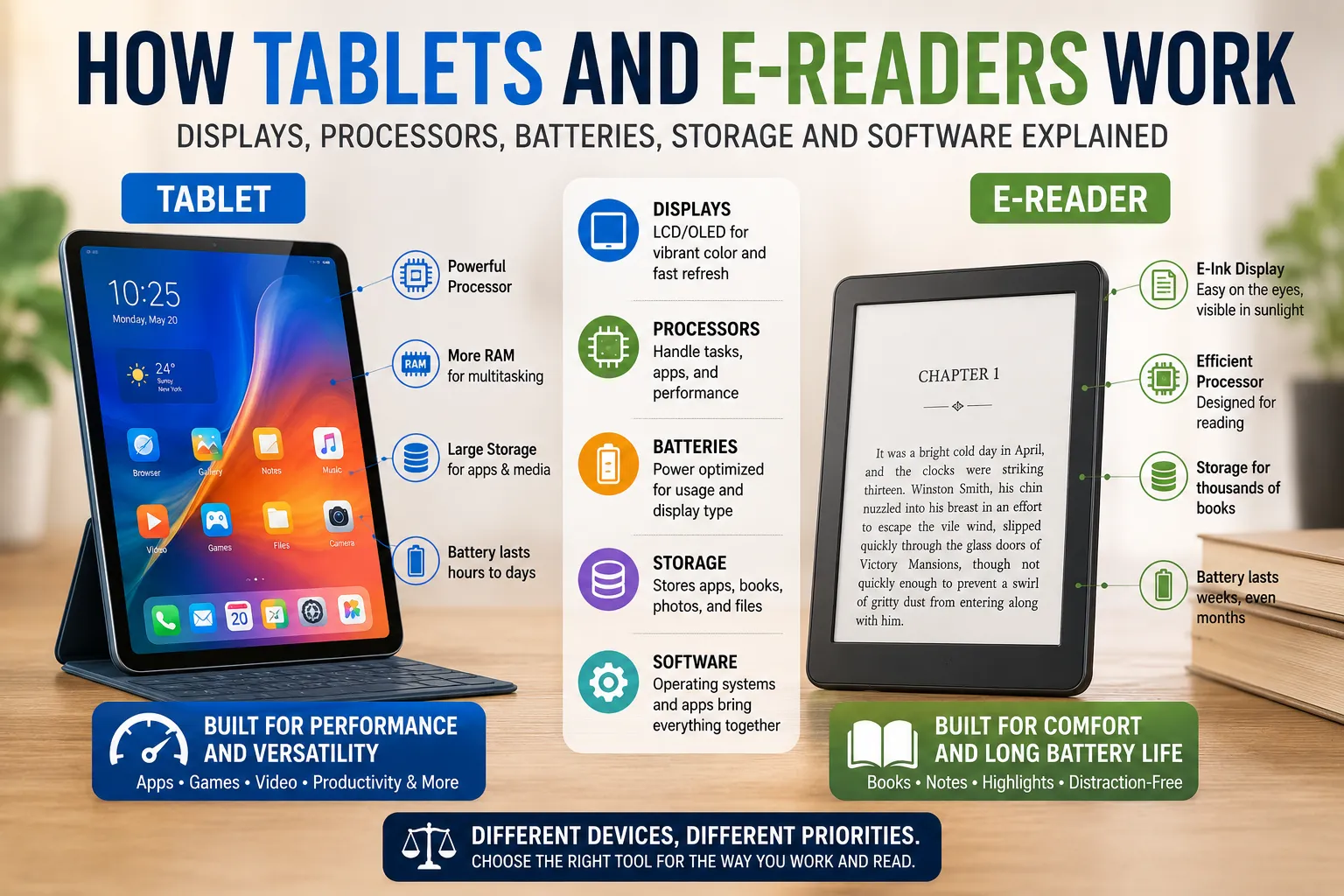
Tablets and e-readers may look similar at first glance, but they are designed around very different priorities.
A tablet is essentially a compact general-purpose computer. It can browse the web, stream video, run games, edit documents, take photographs, communicate with other devices, and support thousands of applications.
An e-reader, by contrast, is designed primarily for reading digital books and other text-based content. Its hardware and software are optimized for long battery life, comfortable reading, portability, and a distraction-free experience.
Despite those differences, both devices rely on the same fundamental building blocks: a display, processor, memory, storage, battery, operating system, connectivity hardware, and software.
Understanding how those components work together explains why tablets can perform so many demanding tasks while e-readers can sometimes run for weeks or even months between charges. These differences also illustrate the broader principles explained in What Are Consumer Gadgets and How Do Modern Gadgets Work?.
## What Is a Tablet?
A tablet is a portable computing device built around a touchscreen interface.
It generally contains many of the same fundamental components found in smartphones and computers, including:
- A processor
- RAM
- Internal storage
- A display
- Battery
- Wireless connectivity
- Cameras
- Speakers
- Microphones
- Sensors
- An operating system
The main difference is the form factor.
Tablets typically have larger screens than smartphones while remaining lighter and more portable than laptops.
They can be used for entertainment, communication, education, productivity, gaming, creative work, and general computing.
## What Is an E-Reader?
An e-reader is a specialized electronic device designed primarily for reading digital books.
Its hardware is generally optimized around a smaller number of priorities:
- Comfortable reading
- Low power consumption
- Lightweight design
- Long battery life
- High visibility in different lighting conditions
- Simple navigation
- Storage for large digital libraries
Many dedicated e-readers use electronic ink, also known as E Ink, rather than the conventional LCD or OLED displays commonly found in tablets.
That difference has a major effect on how the devices operate.
## How Tablet Displays Work
Most modern tablets use LCD, OLED, or a related display technology.
### LCD Displays
LCD stands for liquid-crystal display.
An LCD panel contains layers that control how light passes through tiny liquid-crystal elements. Because the liquid crystals do not normally produce their own light, LCD tablets require a backlight.
The backlight shines through the display, while the pixels control how much light and which colors are visible.
A color pixel typically contains smaller red, green, and blue components.
By adjusting these components at different intensities, the display can produce a wide range of colors.
### OLED Displays
OLED stands for organic light-emitting diode.
Unlike a conventional LCD, an OLED display can produce light at the pixel level.
Each pixel contains light-emitting elements that can be controlled individually.
This provides several potential advantages, including:
- Deep blacks
- High contrast
- Fast response times
- Thin display designs
- Strong color reproduction
Because individual pixels can be turned off completely, an OLED screen can display very dark areas without illuminating them in the same way an LCD backlight does.
## Why Tablet Screens Use So Much Power
A tablet display can be one of the largest consumers of battery power.
The screen may contain millions of pixels that must be controlled continuously.
Watching video, playing games, using high brightness, or running applications that constantly update the display can increase energy consumption.
Modern tablets therefore use several techniques to improve efficiency.
These can include:
- Adaptive brightness
- Variable refresh rates
- Automatic screen timeout
- Low-power display modes
- More efficient processors
- Software-based power management
Some high-end tablets can also adjust their refresh rate depending on what is happening on screen.
A static document may not need the same refresh rate as a fast-moving game.
## What Refresh Rate Means
Refresh rate refers to how frequently a display updates its image, usually measured in hertz.
A 60 Hz display refreshes up to 60 times per second.
Higher refresh rates can make scrolling, animations, and games appear smoother.
However, refreshing the display more frequently can consume additional energy.
This creates a trade-off between responsiveness and battery efficiency.
## How Touchscreens Work
The touchscreen is another important component of a tablet.
Most modern tablets use capacitive touch technology.
The screen contains a transparent conductive layer that detects changes in an electrical field when a finger touches the surface.
Because the human body conducts electricity, touching the screen changes the electrical characteristics at a particular location.
The device’s controller interprets those changes and determines where the touch occurred.
Modern touchscreens can detect multiple contact points simultaneously.
This is known as multi-touch.
It allows users to perform gestures such as:
- Pinching to zoom
- Spreading two fingers apart
- Swiping
- Rotating objects
- Tapping multiple controls
## How E-Ink Displays Work
E-readers often use a fundamentally different display technology.
Electronic ink displays contain extremely small particles or capsules that respond to electrical signals.
In many common implementations, tiny capsules contain charged particles of different colors suspended within a fluid.
Applying an electrical field moves the particles toward or away from the visible surface.
The resulting arrangement forms letters, images, or other patterns.
The display does not need to continuously emit light to keep a page visible.
This is one of the major reasons e-readers can consume dramatically less energy while displaying static text than conventional illuminated screens.
## Why E-Ink Looks Different From a Tablet
Electronic ink is designed to resemble printed material more closely than a conventional LCD or OLED screen.
Because the display reflects ambient light rather than relying primarily on a continuously illuminated image, text can remain highly visible in bright environments.
This is particularly useful outdoors.
A conventional tablet can become difficult to see when strong sunlight reflects from its glossy screen.
An e-reader with an electronic-ink display can often remain readable under those conditions.
## E-Ink and the Paper-Like Reading Experience
The appeal of electronic ink is not simply its low power consumption.
The display is also designed to produce a reading experience that resembles physical ink on paper.
The screen does not need to constantly illuminate every pixel to keep a page visible.
As a result, reading on an e-reader can feel substantially different from looking at a traditional computer or tablet display.
However, electronic ink also has limitations.
Page changes can take longer than updates on an LCD or OLED display, making it less suitable for fast animation, high-frame-rate video, or sophisticated interactive applications.
## Front Lights on E-Readers
Many modern e-readers include built-in lighting.
This can seem contradictory because one of the attractions of electronic ink is that it does not require a conventional backlight.
The difference is where the light is directed.
Rather than shining light through the display from behind like a conventional tablet backlight, an e-reader’s lighting system can illuminate the surface of the display from the front.
This allows users to read in dark environments while retaining many of the characteristics associated with electronic ink.
Some devices also allow users to adjust the color temperature of the front light.
## The Processor Is the Device’s Computing Engine
Both tablets and e-readers require processors.
The processor, or central processing unit, executes instructions provided by software.
On a tablet, the processor may handle tasks such as:
- Running applications
- Processing web pages
- Decoding video
- Managing graphics
- Handling touch input
- Encrypting data
- Communicating with wireless networks
- Managing sensors
Modern tablets often use highly integrated chips known as systems-on-chip, or SoCs.
An SoC can combine multiple computing components into a single package.
## What Is a System-on-Chip?
A system-on-chip can contain several different processing units.
Depending on the device, it may include:
- CPU cores
- Graphics processing units
- Neural-processing hardware
- Image-processing components
- Memory controllers
- Security components
- Connectivity controllers
This integration saves space and can improve efficiency.
It also allows manufacturers to design hardware specifically around the needs of a mobile device.
## Tablet Processors Balance Speed and Efficiency
A tablet processor has to deliver enough performance for demanding applications without consuming excessive battery power.
This is a difficult engineering balance.
A faster processor can perform more work in less time, but high-performance computing can generate more heat and consume more energy.
Modern mobile processors therefore use techniques such as multiple CPU cores and dynamic power management.
Some cores can be designed for high-performance tasks, while others prioritize efficiency.
The operating system can assign workloads according to what the device is doing.
## E-Reader Processors Have Different Priorities
An e-reader usually does not need the processing power required by a tablet.
Its processor may primarily handle:
- Page rendering
- Touch input
- File management
- Wireless communication
- Interface operations
- Display updates
- Basic background tasks
Because the device does not need to continuously render complex video games or high-resolution animations, it can operate with much less processing power.
This contributes to its long battery life.
## What RAM Does
RAM, or random-access memory, is the device’s short-term working memory.
When applications are running, the operating system and processor use RAM to store information that needs to be accessed quickly.
For example, when a tablet has several applications open, data associated with those applications can occupy RAM.
RAM is different from storage.
When the device is switched off, information stored in RAM generally disappears.
Files stored in internal storage remain available.
## Why Tablets Need More RAM
Modern tablet applications can be relatively demanding.
Web browsers may have many tabs open. Games can require substantial amounts of memory. Video-editing applications may process large files.
More RAM can allow a device to keep more information readily available and reduce the need to repeatedly reload applications.
However, more RAM does not automatically make every device faster.
Overall performance depends on the processor, storage, software optimization, memory architecture, and workload.
## How Storage Works
Storage is where the device keeps information when it is not actively being processed.
This can include:
- Applications
- Books
- Photographs
- Videos
- Music
- Documents
- System files
- Downloaded content
Tablets generally use flash storage.
Flash storage has no moving mechanical parts, making it well suited to portable devices.
E-readers also use flash storage, although their storage requirements are usually lower.
Thousands of text-based books can occupy relatively little space compared with high-resolution video.
## Why Storage Matters More on Tablets
A single high-resolution video can consume considerably more storage than an entire collection of digital books.
Tablet users may store games, photographs, downloaded movies, music, documents, and applications.
This can make storage capacity an important purchasing consideration.
E-reader storage is generally focused on books and related content, although some models can also store audiobooks and other media.
## Cloud Storage Changes How Devices Are Used
Modern tablets can access cloud storage services through the internet.
Instead of keeping every file on the device, users can store documents and photographs remotely and download them when needed.
Cloud services can also synchronize information across multiple devices.
For example, a document edited on a tablet can potentially become available on a computer or smartphone.
E-readers can use cloud synchronization to maintain reading positions, libraries, notes, and other information across compatible devices and applications.
## Battery Technology Powers Both Devices
Portable electronics depend heavily on rechargeable batteries.
Most modern tablets and e-readers use lithium-based battery technology.
A battery stores chemical energy and releases it as electrical energy when the device is operating.
The device’s power-management system regulates how that energy is distributed.
Different components consume different amounts of power.
The display, processor, wireless radios, speakers, cameras, and storage systems can all contribute to overall energy consumption.
For more on how charging systems influence portable devices, see the Complete Guide to Charging Technology.
## Why E-Readers Can Last So Long
The long battery life of many e-readers comes from a combination of hardware and software choices.
The electronic-ink display consumes relatively little energy while displaying an unchanged page.
The processor is usually less powerful than a tablet processor.
Wireless communication can be used intermittently rather than continuously.
The operating system can also aggressively minimize background activity.
As a result, an e-reader can often spend much of its time in a low-power state.
## Tablets Require More Frequent Charging
Tablets perform far more computationally intensive tasks.
They may continuously illuminate their screens, process video, maintain wireless connections, run background applications, and perform complex calculations.
That means their batteries generally need to be recharged more frequently than those of dedicated e-readers.
Actual battery life depends heavily on usage.
A tablet used primarily for reading with low brightness may last considerably longer than one used for gaming or video streaming.
## What the Operating System Does
The operating system is the software layer that coordinates the device’s hardware and applications.
It manages:
- Memory
- Storage
- Applications
- Hardware
- Security
- Connectivity
- User interfaces
- Permissions
- Files
- Power management
Without an operating system, the device’s hardware would not provide a practical environment for everyday users.
## Tablet Operating Systems
Tablet operating systems are designed to support general-purpose computing.
They typically provide interfaces optimized for touchscreens and larger displays.
Features can include:
- Application stores
- Multitasking
- Notifications
- File management
- Accessibility tools
- Bluetooth connectivity
- Wi-Fi
- Camera integration
- External-display support
- Keyboard and stylus support
The software ecosystem is one of the major differences between a tablet and an e-reader.
A tablet can run a wide range of applications.
## E-Reader Software Is More Specialized
E-reader software is generally designed around reading rather than general-purpose computing.
It may include:
- Digital library management
- Book downloads
- Text resizing
- Font selection
- Bookmarks
- Highlights
- Notes
- Dictionary tools
- Search
- Reading progress
- Synchronization
- Accessibility features
The simplified software environment helps keep the device focused on its primary purpose.
## How Digital Books Are Displayed
An e-book is not necessarily just a photograph of a printed page.
Many digital books use formats that allow text to be reflowed.
This means the software can adjust the amount of text displayed on a page based on screen size, font size, margins, and other settings.
Increasing the font size can therefore cause the text to move onto additional pages rather than simply enlarging a fixed image.
This is particularly useful for accessibility.
## Fonts and Text Rendering Matter
When an e-reader displays a book, its software has to convert digital text into visible characters.
This process is called text rendering.
The software determines:
- Font
- Size
- Weight
- Spacing
- Line height
- Margins
- Alignment
- Page layout
Good text rendering can make a significant difference to reading comfort.
Even a high-quality display can feel unpleasant if the typography is poorly designed.
## Tablets Can Also Be Used as E-Readers
A tablet can display digital books using dedicated reading applications.
The advantage is flexibility.
A tablet can provide access to books alongside websites, videos, games, email, productivity applications, and other content.
The disadvantage is that tablets are often more distracting and consume more power.
An e-reader is more specialized, while a tablet is more versatile.
## Connectivity Allows Devices to Communicate
Both tablets and many e-readers can connect to wireless networks.
Wi-Fi allows devices to:
- Download content
- Synchronize data
- Install software updates
- Browse online services
- Back up information
- Connect to cloud platforms
Some tablets also support cellular connectivity, allowing internet access without a Wi-Fi network.
Certain e-readers offer cellular connectivity as well, although their use cases are generally more limited.
## Bluetooth Connects Accessories
Bluetooth provides short-range wireless communication between devices.
On tablets, it can connect:
- Wireless headphones
- Keyboards
- Mice
- Speakers
- Game controllers
- Styluses and other accessories
E-readers that support Bluetooth can sometimes connect to wireless headphones or speakers for audiobook playback.
## Sensors Help Tablets Understand Their Environment
Tablets can contain numerous sensors.
These may include:
- Accelerometers
- Gyroscopes
- Ambient-light sensors
- Magnetometers
- Proximity sensors
- Location sensors
An accelerometer can detect movement and orientation.
This allows the tablet to automatically rotate its screen when the user changes the device’s orientation.
Other sensors can support navigation, gaming, photography, automatic brightness adjustment, and accessibility features.
## Cameras Turn Tablets Into More Than Reading Devices
Many tablets include front and rear cameras.
The rear camera can be used for photography, scanning documents, recording video, or capturing information.
The front camera is commonly used for video calls and other communication.
E-readers generally place far less emphasis on cameras because photography and video are not central to their purpose.
## Graphics Processing Makes Tablets Visual Powerhouses
A graphics processing unit, or GPU, handles many calculations associated with displaying and manipulating visual information.
On tablets, the GPU can support:
- Games
- Video playback
- Animations
- Image editing
- 3D applications
- User-interface effects
Modern tablet GPUs can perform substantial parallel calculations while operating within tight mobile power constraints.
E-readers generally require much simpler graphics capabilities because their interfaces and displays are optimized for static text and basic visual content.
## Software Updates Keep Devices Useful
Both tablets and e-readers can receive software updates.
Updates may provide:
- Security improvements
- Bug fixes
- New features
- Performance improvements
- Compatibility changes
- Interface improvements
Security updates are particularly important for internet-connected devices.
However, the length of software support can vary between manufacturers and device models.
This is an important consideration when buying a device intended to remain useful for many years.
## Accessibility Is Built Into Modern Devices
Software can make tablets and e-readers more accessible to people with different needs.
Features may include:
- Text resizing
- Screen magnification
- High-contrast options
- Screen readers
- Adjustable fonts
- Voice controls
- Captions
- Audio descriptions
- Touch accommodations
E-readers have a particularly useful advantage for text accessibility because users can often change font size, typeface, spacing, and margins.
## Security Protects Personal Information
Tablets can contain significant amounts of personal information.
They may store photographs, messages, financial applications, documents, passwords, browsing data, and work files.
Security features can include:
- Device encryption
- Secure authentication
- Application permissions
- Biometric authentication
- Secure boot systems
- Sandboxing
- Remote-device management
E-readers generally hold less sensitive information, but account credentials, purchase information, and personal reading data can still require protection.
## Why Tablets and E-Readers Feel So Different
The difference between the two device categories is ultimately a matter of priorities.
A tablet is designed to provide computing flexibility.
An e-reader is designed to provide reading efficiency.
That difference affects almost every component.
| Component | Tablet | E-Reader |
|---|---|---|
| Display | Usually LCD or OLED | Often electronic ink |
| Processor | More powerful | Lower-power |
| RAM | Generally higher | Generally lower |
| Storage | Designed for apps and media | Primarily books and related content |
| Battery | Typically hours to days depending on use | Often many days or weeks |
| Software | General-purpose | Reading-focused |
| Apps | Broad ecosystem | More limited |
| Graphics | Designed for rich media | Optimized for text |
| Connectivity | Usually extensive | Usually focused on downloads and syncing |
| Primary purpose | General computing | Digital reading |
The exact specifications vary considerably, but the underlying design philosophy remains consistent.
## What Happens When You Tap an App on a Tablet?
A simple tap on a tablet triggers a surprisingly complex chain of events.
The touchscreen detects the contact and sends information to the device’s processing system.
The operating system identifies which application should respond.
The processor executes the relevant instructions.
RAM provides temporary working space.
The application may request information from storage.
The GPU may render visual elements.
The display controller then sends the appropriate signals to the screen.
All of this can happen extremely quickly.
What feels like a simple interaction is actually the coordinated operation of numerous hardware and software components.
## What Happens When You Turn an E-Reader Page?
Turning a page involves a simpler but still sophisticated process.
When the user taps or swipes, the touchscreen detects the gesture.
The operating system determines which action was requested.
The processor retrieves the appropriate section of the book from storage.
The software renders the new page using the selected typography and layout.
The display controller then changes the electronic-ink particles to create the new page.
Once the page is displayed, the device can consume very little energy maintaining that image.
That is a major reason e-readers can operate for such long periods.
## Why Neither Device Is Better for Everything
The choice between a tablet and an e-reader depends on what the user wants to accomplish.
A tablet is generally better suited to:
- Video
- Gaming
- Web browsing
- Video calls
- Productivity
- Creative applications
- Social media
- General computing
An e-reader is generally better suited to:
- Long reading sessions
- Digital books
- Outdoor reading
- Distraction-free reading
- Lightweight portability
- Long periods between charges
There is considerable overlap, but the fundamental hardware differences remain important.
### Different Devices Built Around Different Priorities
Tablets and e-readers demonstrate an important principle in consumer technology: hardware design reflects intended use.
Tablets devote substantial resources to processors, graphics, bright displays, wireless connectivity, cameras, applications, and multitasking. They are designed to perform many different computing tasks.
E-readers make different trade-offs. Their electronic-ink displays, simpler processors, specialized software, and aggressive power management are designed around a narrower goal: making digital reading convenient and efficient.
Neither approach is universally superior.
A tablet is essentially a portable computer with a touchscreen, while an e-reader is a specialized digital reading device. Understanding the differences in their displays, processors, batteries, storage, connectivity, and software makes it easier to choose the right tool—and explains why two devices that can both display a page of text can behave so differently in everyday use.