What Is E-Commerce Technology and How Do Online Business Systems Work?
E-commerce has transformed the way businesses sell products and services. A customer can discover a product, compare options, place an order, make a payment, receive confirmation, and track a delivery without ever visiting a physical store.
Behind that seemingly simple experience is a complex network of technologies working together.
E-commerce technology includes the software, hardware, networks, databases, payment systems, security tools, cloud infrastructure, and business applications that allow companies to operate online. These systems do much more than display products on a website. They connect customers with inventory, payments, order processing, logistics, customer service, marketing, analytics, and financial operations.
Understanding how these systems work helps explain why successful online businesses are not simply websites. They are interconnected digital operations in which many different technologies communicate with one another.
What Is E-Commerce Technology?
E-commerce technology refers to the collection of digital technologies used to create, operate, manage, and support online commerce.
At its simplest, an e-commerce system allows a business to:
- Display products or services online.
- Accept customer orders.
- Process payments.
- Manage inventory.
- Fulfill orders.
- Communicate with customers.
- Track business activity.
- Analyze performance.
A small online store might accomplish these functions through a single e-commerce platform.
A large retailer, however, may use dozens or hundreds of interconnected systems.
These could include an online storefront, customer relationship management platform, enterprise resource planning system, payment gateway, warehouse management system, accounting software, marketing platforms, analytics tools, shipping services, and customer support applications.
This is why understanding the broader Complete Guide to Business Software can be useful when examining how e-commerce businesses operate.
The Basic Architecture of an Online Business
An online business can be thought of as several interconnected layers.
At the customer-facing level is the digital storefront.
Behind it are systems responsible for:
- Product information
- Customer accounts
- Shopping carts
- Orders
- Payments
- Inventory
- Fulfillment
- Shipping
- Marketing
- Customer service
- Accounting
- Analytics
These systems communicate through databases, APIs, integrations, and other forms of digital infrastructure.
A customer might see only a product page and checkout screen, but dozens of processes can happen in the background when an order is placed.
How an E-Commerce Website Works
The online storefront is the part of the system customers interact with directly.
A typical e-commerce website contains:
- Product pages
- Categories
- Search
- Shopping carts
- Checkout
- Customer accounts
- Payment options
- Order tracking
- Contact and support features
When someone visits the website, their browser requests information from the business’s servers or cloud infrastructure.
The system retrieves information such as product names, prices, images, descriptions, availability, and shipping options.
The website then presents that information in a format the customer can interact with.
Modern storefronts can be powered by traditional web applications, headless commerce platforms, mobile applications, or combinations of these technologies.
What Happens When a Customer Adds Something to a Cart?
Adding a product to a shopping cart may look like a simple action, but the system has to perform several checks.
For example, it may need to determine:
- Which product was selected?
- What quantity was requested?
- What is the current price?
- Is the product available?
- Does the customer qualify for a discount?
- Is the item subject to specific shipping rules?
- Which inventory location should fulfill the order?
The cart system stores these details so they can be used during checkout.
For logged-in customers, the information may be associated with their account. For guest shoppers, it may be temporarily stored using browser or session technologies.
How Online Checkout Works
Checkout brings several systems together.
A customer typically provides:
- Name
- Email address
- Delivery information
- Billing information
- Payment details
- Shipping preferences
The system calculates the final transaction amount.
This can include:
- Product prices
- Discounts
- Taxes
- Shipping fees
- Other applicable charges
Once the customer submits the order, the e-commerce platform begins coordinating the transaction.
This is where payment technology becomes particularly important.
How Online Payments Work
E-commerce businesses generally rely on payment processors and gateways to handle electronic transactions.
The customer chooses a payment method, and the payment information is securely transmitted through the relevant payment infrastructure.
The payment system may then:
- Authenticate the transaction.
- Check whether the payment method is valid.
- Request authorization.
- Approve or decline the transaction.
- Return the result to the e-commerce platform.
The store can then update the order based on the payment result.
The actual movement of money involves financial institutions and payment networks operating behind the scenes.
This means an online store does not necessarily process payments entirely by itself.
Instead, it typically connects to specialized financial infrastructure.
What Happens After an Order Is Placed?
The customer might simply see an order confirmation.
Behind the scenes, however, the business begins processing the order.
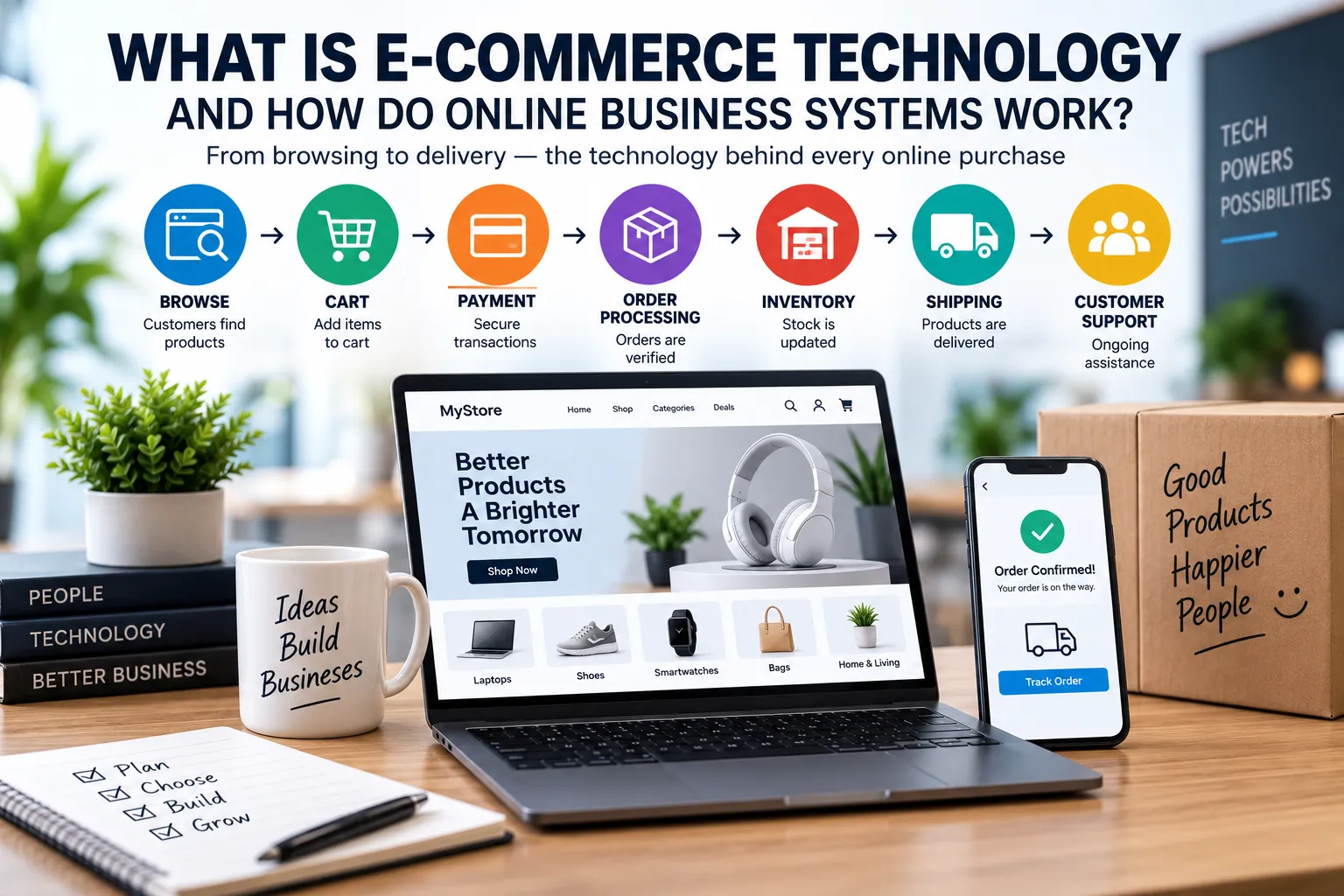
A typical workflow could look like this:
Customer → Storefront → Cart → Checkout → Payment → Order System → Inventory → Warehouse → Shipping → Customer
The order system records details such as:
- Customer information
- Products purchased
- Quantities
- Payment status
- Shipping address
- Order status
- Fulfillment information
The inventory system may then reserve the required products.
A warehouse or fulfillment operation receives instructions to prepare the order.
Once the package is shipped, tracking information can be sent back to the e-commerce platform and then communicated to the customer.
How Inventory Systems Work
Inventory management is one of the most important parts of e-commerce technology.
A business needs to know how much stock it has available and where that stock is located.
An inventory system can track:
- Products
- Quantities
- Warehouses
- Stock movements
- Incoming inventory
- Reserved inventory
- Returned products
- Damaged products
When a customer purchases an item, inventory levels can be updated automatically.
This helps prevent situations where a business sells products it cannot actually deliver.
For larger companies, inventory systems may connect directly with warehouses, suppliers, purchasing systems, and enterprise software.
The Role of Databases
Databases are fundamental to online business systems.
An e-commerce application needs somewhere to store information about:
- Products
- Customers
- Orders
- Payments
- Inventory
- Discounts
- Reviews
- Shipping
- Business operations
Instead of storing all of this information directly inside the visible website, applications generally communicate with databases.
When a customer searches for a product, the application can retrieve relevant information from the database.
When an order is created, the order information can be stored in the database.
When inventory changes, the relevant records can be updated.
Databases therefore provide much of the underlying memory of an online business.
APIs Connect Different Systems
Modern e-commerce businesses rarely rely on one application for everything.
Different systems need to communicate with one another.
This is where APIs, or application programming interfaces, become important.
An API provides a structured way for one application to communicate with another.
For example, an online store might communicate with:
- A payment processor
- A shipping provider
- An accounting platform
- An inventory system
- A marketing platform
- A customer service application
- An analytics system
When these systems are connected properly, information can move between them automatically.
This creates a larger digital ecosystem rather than a collection of isolated applications.
Why Cloud Computing Matters to E-Commerce
Cloud computing has become an important part of modern online business infrastructure.
Instead of operating every server and software system inside its own physical facility, a business can use cloud infrastructure provided by specialized technology companies.
Cloud systems can provide:
- Computing resources
- Databases
- Storage
- Networking
- Security services
- Backup infrastructure
- Monitoring
- Application hosting
The broader Complete Guide to Cloud Software and SaaS provides useful context for understanding why cloud-based applications have become so important to modern businesses.
For e-commerce companies, cloud infrastructure can make it easier to handle changing workloads.
A website might have relatively little traffic during normal periods but experience a dramatic increase during a major promotion.
Cloud infrastructure can help businesses provision resources according to demand.
What Is SaaS in E-Commerce?
Software as a Service, commonly called SaaS, allows businesses to use software through an ongoing service rather than managing the entire underlying infrastructure themselves.
E-commerce companies may use SaaS products for:
- Store management
- Email marketing
- Accounting
- Customer relationship management
- Project management
- Analytics
- Customer support
- Inventory management
This model can reduce the technical burden of operating software internally.
Instead of building every system from scratch, businesses can subscribe to specialized services and connect them together.
How Customer Accounts Work
Many e-commerce businesses allow customers to create accounts.
A customer account can store information such as:
- Name
- Contact details
- Addresses
- Order history
- Preferences
- Saved products
- Loyalty information
Customer accounts can make repeat purchases easier.
However, they also create security responsibilities.
Businesses must protect account credentials and personal information from unauthorized access.
This is why authentication, authorization, encryption, secure software development, and monitoring are important components of online commerce.
How E-Commerce Security Works
Online businesses face a variety of security risks.
Potential threats include:
- Stolen credentials
- Fraudulent transactions
- Account takeovers
- Malware
- Data breaches
- Automated attacks
- Payment fraud
- Denial-of-service attacks
Security therefore has to be incorporated throughout the technology stack.
Businesses can use measures such as:
- Secure authentication
- Multi-factor authentication
- Encryption
- Access controls
- Security monitoring
- Fraud detection
- Software updates
- Network protections
- Secure payment infrastructure
Security is not a single feature that can simply be switched on.
It is an ongoing process involving technology, policies, people, and monitoring.
How Businesses Use Automation
Automation is one of the biggest advantages of modern e-commerce technology.
An online business can automatically perform many tasks that would otherwise require employees to perform them manually.
For example, an order can automatically trigger:
- Payment processing
- Inventory updates
- Confirmation emails
- Warehouse notifications
- Shipping requests
- Customer records
- Accounting entries
- Analytics events
Businesses can also automate marketing campaigns, customer communications, reporting, inventory alerts, and administrative processes.
The broader Business Automation Guide explores how organizations use technology to reduce repetitive work and improve operational efficiency.
How E-Commerce Marketing Systems Work
Getting customers to an online store is another major technology challenge.
Businesses may use systems for:
- Search engine optimization
- Email marketing
- Social media marketing
- Paid advertising
- Content marketing
- Affiliate marketing
- Customer loyalty programs
- Personalized recommendations
These systems can connect customer activity with marketing campaigns.
For example, a customer might browse a product without purchasing it.
Depending on the business’s technology setup and privacy practices, that interaction could contribute to analytics or trigger an appropriate marketing workflow.
The goal is to understand customer behavior and make the buying experience more relevant.
The Role of Analytics
E-commerce businesses generate enormous amounts of data.
Analytics systems can help companies understand:
- Website traffic
- Product views
- Conversion rates
- Shopping cart abandonment
- Average order value
- Customer acquisition
- Repeat purchases
- Product performance
- Marketing effectiveness
A business can use this information to identify what is working and where customers are encountering problems.
For example, if thousands of visitors view a product but very few purchase it, the company may investigate price, product information, shipping costs, availability, or checkout problems.
Data turns customer activity into information that businesses can use for decision-making.
How Customer Service Fits Into the System
Customer service is increasingly connected to the rest of an online business’s technology stack.
Support teams may need access to:
- Customer profiles
- Order histories
- Payment information
- Shipping status
- Previous conversations
- Product information
Instead of asking customers to explain everything from the beginning, support representatives can use connected systems to understand the situation.
Businesses may also use chatbots, automated notifications, knowledge bases, and ticketing systems to handle common requests.
The objective is not simply automation. It is creating a support experience that resolves problems efficiently.
Returns and Refunds Need Technology Too
The transaction does not necessarily end when a product is delivered.
Customers may return products or request refunds.
An e-commerce system may need to coordinate:
- Return requests.
- Return authorization.
- Shipping instructions.
- Warehouse receipt.
- Product inspection.
- Inventory updates.
- Refund processing.
- Customer notifications.
A well-designed system keeps these processes connected.
Poorly integrated systems can create delays, inaccurate inventory records, and frustrating customer experiences.
How Business Software Fits Into E-Commerce
E-commerce platforms are only one part of a company’s technology environment.
Businesses may also rely on software for:
- Accounting
- Human resources
- Payroll
- Customer relationships
- Inventory
- Procurement
- Analytics
- Communication
- Project management
- Document management
This is why understanding how businesses evaluate and purchase technology solutions for organizational needs is important.
Choosing technology is not simply about finding individual applications.
Businesses need to consider how systems work together and whether they support the organization’s broader objectives.
Why Integration Is So Important
Imagine an online retailer where every department uses a completely separate system.
The sales team might have one customer database.
The warehouse might have another.
Accounting might maintain separate order records.
Customer service might have no access to shipping information.
Employees would need to manually transfer information between systems.
That creates inefficiency and increases the risk of errors.
Integrated systems can reduce these problems by allowing information to move automatically between applications.
Integration therefore becomes increasingly important as an online business grows.
What Happens When E-Commerce Systems Fail?
Because online businesses depend on interconnected technology, a failure in one part of the system can affect many others.
For example:
Payment failure → Customers cannot complete purchases
Inventory failure → Stock availability becomes inaccurate
Database failure → Website functionality may be disrupted
Shipping integration failure → Orders may not receive tracking information
Cloud infrastructure problems → Website availability may be affected
This is why reliability, backups, monitoring, redundancy, and disaster recovery are important components of serious e-commerce operations.
Small Businesses Can Use Sophisticated Technology Too
Modern technology has made sophisticated business capabilities accessible to smaller companies.
A small retailer can potentially use:
- Online storefront technology
- Cloud accounting
- Digital payments
- Automated marketing
- Inventory software
- Customer management systems
- Analytics
- Cloud storage
The business does not necessarily need to build these systems itself.
Instead, it can combine specialized services into a technology stack appropriate for its size and needs.
This allows small companies to compete digitally without owning enormous amounts of infrastructure.
How E-Commerce Changes as a Business Grows
A company’s technology requirements usually become more complicated as the business expands.
A small business might initially have:
Website → Payment System → Spreadsheet
Later, it may evolve into:
Website → E-Commerce Platform → Payment Gateway → Inventory → Accounting → CRM → Marketing → Analytics → Shipping
At a much larger scale, the organization may add enterprise resource planning, warehouse management, advanced analytics, dedicated security infrastructure, customer data platforms, and numerous other systems.
Growth therefore creates both opportunities and technology challenges.
The Importance of Choosing the Right Technology Stack
An e-commerce technology stack is the collection of technologies a business uses to operate its digital commerce activities.
It may include:
- Front-end software
- Back-end applications
- Databases
- Cloud infrastructure
- Payment services
- APIs
- Security tools
- Analytics
- Business applications
There is no single technology stack that is ideal for every company.
A small online business may prioritize simplicity and low operating costs.
A rapidly growing company may prioritize scalability and integrations.
A large enterprise may prioritize customization, control, security, and integration with existing systems.
The right technology depends on the business model and operational requirements.
Where Artificial Intelligence Fits Into E-Commerce
Artificial intelligence is increasingly being incorporated into online business systems.
Potential applications include:
- Product recommendations
- Customer service
- Fraud detection
- Demand forecasting
- Search
- Content generation
- Marketing personalization
- Inventory forecasting
- Data analysis
- Workflow automation
AI does not necessarily replace the underlying e-commerce infrastructure.
Instead, it can become another layer that uses information from existing systems to perform analysis, predictions, or automated tasks.
As AI systems become more capable, businesses may increasingly use them to coordinate complex workflows across multiple applications.
The Future of Online Business Systems
E-commerce technology is moving toward greater automation, integration, personalization, and intelligence.
Online businesses are increasingly becoming interconnected digital ecosystems rather than simple websites.
Customers expect fast websites, convenient payments, accurate delivery information, personalized experiences, responsive support, and reliable service.
Meeting those expectations requires technology that works together behind the scenes.
The most successful online businesses will therefore need to think beyond individual software products. They will need to build technology environments in which storefronts, payments, inventory, customer service, marketing, analytics, and business operations can communicate efficiently.
From Online Stores to Connected Digital Businesses
E-commerce technology has evolved far beyond the basic idea of putting products on a website.
A modern online business can be viewed as a connected system in which customer interactions trigger processes across many different technologies.
A customer clicks a product.
The system retrieves information from a database.
The customer adds it to a cart.
The inventory system checks availability.
Checkout calculates the total.
A payment service authorizes the transaction.
The order system records the purchase.
The warehouse receives fulfillment information.
The shipping system generates tracking information.
The customer receives updates.
Accounting records the transaction.
Analytics captures the relevant business data.
All of this can happen within minutes or even seconds.
That interconnected infrastructure is what makes modern e-commerce possible. The storefront may be what customers see, but the real engine of an online business is the network of software, cloud services, databases, payment systems, integrations, automation, and people working together behind it.