What Is Project Management Software and How Does It Work?
Managing a project can become complicated quickly. Even a relatively small team may have deadlines to track, documents to organize, meetings to coordinate and dozens of individual tasks to complete.
Project management software is designed to bring those moving parts into one place.
Instead of relying on scattered spreadsheets, email threads, messaging apps and handwritten notes, teams can use project management platforms to organize work, assign responsibilities, monitor progress and communicate about projects.
The software does not manage a project by itself. Rather, it provides a structured environment that helps people plan the work, coordinate activities and understand what needs to happen next.
As businesses increasingly operate across departments, locations and time zones, these tools have become an important part of modern business technology.
What Is Project Management Software?
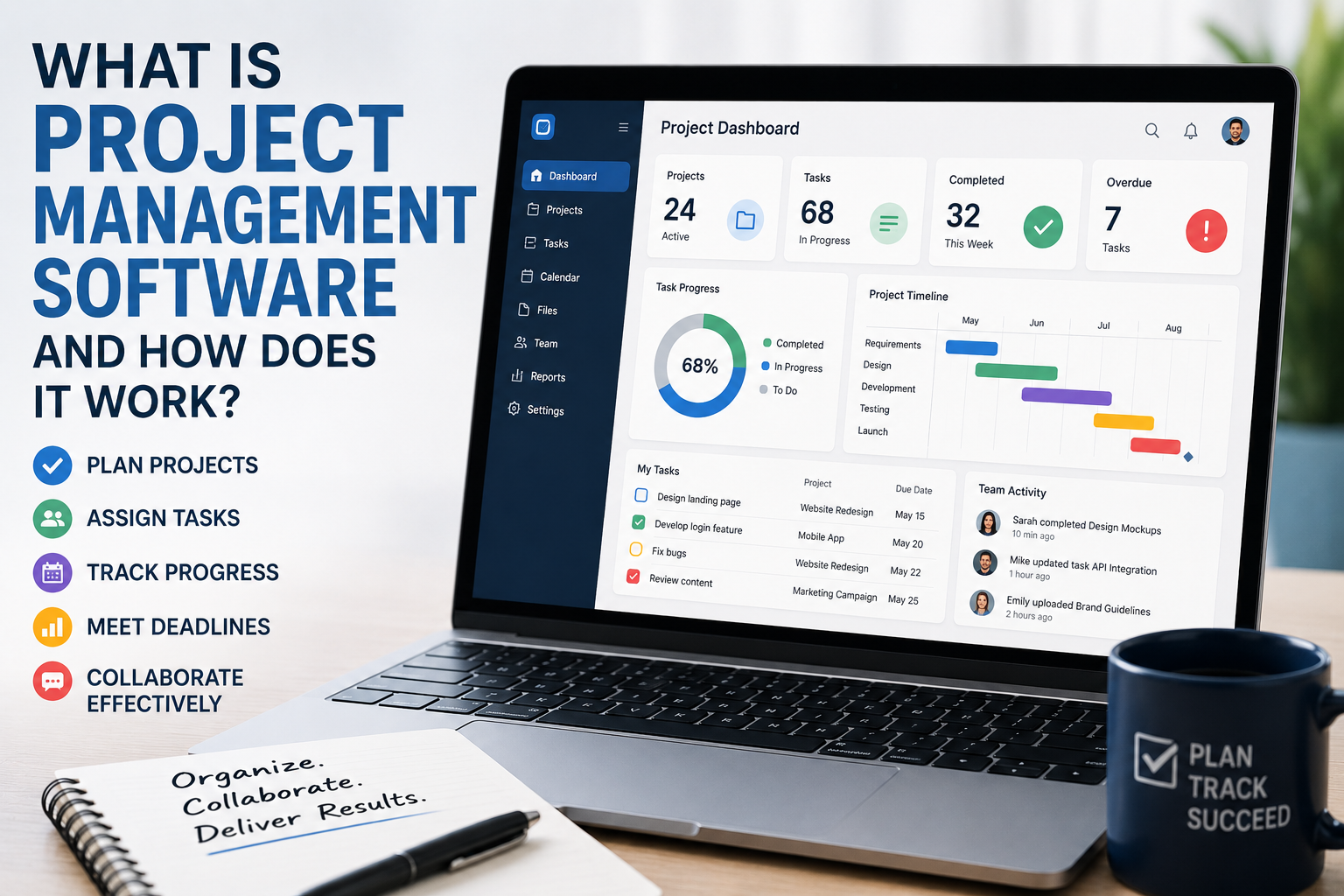
Project management software is a digital tool that helps individuals and organizations plan, organize, execute and monitor projects.
Depending on the platform, it may provide features for:
- Creating and assigning tasks
- Setting deadlines
- Building project schedules
- Tracking progress
- Managing documents
- Sharing comments and updates
- Monitoring budgets
- Managing resources
- Creating reports
- Automating repetitive processes
- Communicating with team members
Some platforms are designed for simple task management, while others provide comprehensive systems for managing complex projects involving hundreds of people.
The central idea is straightforward: organize project information in a shared system so people can understand what needs to be done, who is responsible and when it needs to happen.
How Project Management Software Works
Most project management platforms follow a similar basic workflow.
A project manager or team begins by creating a project and defining its objectives. The project is then divided into tasks or stages.
Each task can be assigned to a person or team and given a deadline.
As employees complete their work, they update the status of their tasks. The software uses that information to provide a broader picture of project progress.
For example, a project might contain tasks marked:
- Not started
- In progress
- Waiting
- Completed
- Blocked
This gives team members a shared understanding of where the project stands without requiring everyone to ask for individual updates.
Project management software can also work alongside collaboration software, allowing teams to coordinate conversations, files and tasks within a more connected digital environment.
Projects Are Usually Broken Into Smaller Tasks
Large projects can be difficult to manage as a single unit.
Project management software helps break them into smaller pieces of work.
Imagine a company preparing to launch a new website. The overall project might include separate tasks for:
- Defining requirements
- Designing the website
- Writing content
- Developing the site
- Testing functionality
- Reviewing security
- Preparing marketing materials
- Launching the website
- Monitoring performance after launch
Each stage can then be divided into even smaller tasks.
Breaking work down this way makes responsibilities clearer and makes it easier to identify delays.
Task Assignment Creates Accountability
One of the most basic functions of project management software is assigning tasks.
Instead of simply stating that “someone” needs to complete a particular activity, a manager can assign it to a specific employee or team.
The task may include:
- A description
- An owner
- A deadline
- Supporting documents
- Priority level
- Status
- Comments
- Related tasks
This creates a clear record of responsibility.
When everyone can see who owns a task, there is less ambiguity about who needs to take the next step.
Deadlines Help Teams Manage Time
Projects are usually constrained by time.
A task may need to be completed before another task can begin, or an entire project may need to reach a specific launch date.
Project management software allows teams to assign deadlines and monitor whether work is progressing according to schedule.
Some platforms provide calendars or timelines that show tasks across days, weeks or months.
This makes it easier to identify periods where too much work is scheduled at once.
Dependencies Show How Tasks Relate
Some tasks cannot begin until others are completed.
These relationships are called dependencies.
For example, a construction project might require architectural plans to be approved before construction can begin. A software team might need to finish a database component before another developer can complete an integration.
Project management software can represent these relationships.
If a task is delayed, the system may help managers identify other tasks that could also be affected.
Dependencies are particularly useful for complex projects because they reveal how individual activities contribute to the larger schedule.
Different Views Help People Understand Projects
Project management platforms often allow users to view the same project in different ways.
A list view might display tasks in a straightforward sequence.
A Kanban board can organize work into columns such as “To Do,” “In Progress” and “Done.”
A calendar view emphasizes deadlines.
A timeline or Gantt-style view can show how tasks overlap and depend on one another.
Each view serves a different purpose.
A developer may prefer a task board for day-to-day work, while an executive may prefer a high-level timeline showing whether major milestones remain on schedule.
Collaboration Happens Inside the Project
Modern project management tools increasingly combine task tracking with collaboration features.
Team members can comment directly on tasks rather than discussing every detail through separate email threads.
They may also be able to attach documents, mention colleagues and record decisions.
This creates a useful project history.
Instead of searching through an employee’s inbox to discover why a decision was made, someone joining the project later may be able to find the relevant discussion within the project itself.
This creates an important distinction between project-based collaboration and general workplace communication. Business communication technology can facilitate conversations across an organization, while project management software gives those conversations a direct connection to specific work.
File and Document Management
Projects often involve a large number of documents.
These might include proposals, contracts, designs, spreadsheets, presentations, research materials and technical specifications.
Project management software can provide a central location for these files or integrate with dedicated cloud-storage services.
Keeping documents connected to the relevant tasks can make them easier to find.
It can also reduce confusion over which version of a file is current.
Notifications Keep People Informed
Project management software can send notifications when something changes.
A team member might receive an alert when:
- A task is assigned to them
- A deadline changes
- Someone comments on their work
- A task becomes overdue
- A document is uploaded
- A project reaches a milestone
Notifications can reduce the need for managers to manually communicate every small change.
However, excessive notifications can create a new problem: information overload.
Good project-management practices therefore involve configuring notifications so that important information is visible without constantly interrupting employees.
Automation Reduces Repetitive Work
Many modern project management platforms include automation features.
Automation allows the software to perform routine actions based on predefined conditions.
For example, a system might automatically:
- Assign a task when a project reaches a particular stage
- Notify a manager when a deadline is missed
- Move a task to another workflow column
- Create recurring tasks
- Send reminders
- Update a status field
Automation can save time, particularly for processes that happen repeatedly.
This is closely related to the broader use of business automation, where organizations use software to reduce repetitive administrative work across different functions.
The key is to automate predictable administrative work while keeping important decisions under appropriate human control.
Reporting Helps Managers See the Bigger Picture
A project can contain hundreds of individual tasks, making it difficult for managers to understand overall performance by looking at each task separately.
Reporting tools aggregate project information into dashboards and summaries.
A manager might be able to see:
- Percentage of tasks completed
- Overdue work
- Upcoming deadlines
- Workload by employee
- Project milestones
- Budget information
- Resource utilization
- Project risks
These reports can help identify problems earlier.
If several important tasks are overdue, for example, a manager can investigate before the delay affects the project’s final deadline.
Resource Management Is Another Major Function
Projects depend on people, money, equipment and other resources.
Project management software can help organizations understand how those resources are being used.
For employees, resource-management features may show who is working on which projects and whether someone has too much or too little work.
This can help managers identify bottlenecks.
A highly skilled employee who is assigned to five critical projects at the same time may become a constraint on the entire organization.
Better visibility can help managers distribute work more effectively.
Project Management Software Can Track Budgets
Some platforms also include financial management features.
A project may have a defined budget for labor, equipment, contractors, software or other expenses.
Tracking actual spending against planned spending can help managers identify financial problems before they become serious.
For example, if a project has used 70% of its budget but is only halfway complete, managers may need to reassess the plan.
More specialized financial systems may still be required for accounting and detailed financial reporting, but project-management tools can provide useful operational visibility.
Integrations Connect Different Business Systems
Businesses rarely use a single software application.
A company may use separate systems for accounting, customer relationship management, email, cloud storage, communication and software development.
Project management platforms can integrate with some of these systems.
For example, a project-management system might connect to a cloud-storage service so employees can access files without leaving the project environment.
Other integrations can synchronize information between applications or trigger automated workflows.
Integrations reduce the need for employees to repeatedly enter the same information into different systems and can help create a more connected business software environment.
Cloud-Based Project Management
Many modern project management platforms operate in the cloud.
Instead of installing the entire system on a company’s own servers, users access it through a web browser or mobile application.
Cloud-based systems can make collaboration easier because employees can access project information from different locations.
This is particularly useful for distributed teams.
However, cloud software also means organizations need to consider internet connectivity, account security, data protection and the reliability of the service provider.
Security and Access Controls Matter
Project management systems can contain sensitive business information.
Projects may include confidential contracts, product plans, customer information, financial data or internal discussions.
For this reason, access controls are important.
Organizations may restrict access based on an employee’s role or project responsibilities.
For example, a contractor may need access to a particular project without being able to view unrelated company information.
Additional security measures can include multi-factor authentication, encryption, audit logs and centralized account management.
Project Management Software Is Not the Same as Communication Software
There can be significant overlap between project management platforms and communication tools, but they serve different primary purposes.
Messaging applications are generally optimized for conversations and quick exchanges.
Project management systems are structured around work.
A message may say:
“Can you finish this by Friday?”
A project management system can turn that request into an assigned task with a deadline, supporting files, status and a record of completion.
The distinction matters because conversations can disappear quickly in busy communication channels, while structured project records are easier to track over time.
Who Uses Project Management Software?
Project management software is not limited to large corporations.
Small businesses can use it to organize marketing campaigns, product launches, client work and internal projects.
Larger organizations may use it across multiple departments.
Common users include:
- Software development teams
- Marketing departments
- Construction companies
- Consulting firms
- Financial organizations
- Creative agencies
- Manufacturers
- Nonprofit organizations
- Government departments
- Educational institutions
Even individuals can use basic project-management tools to organize complex personal or professional work.
The Benefits for Businesses
When implemented effectively, project management software can provide several advantages.
Better Visibility
Everyone can see what work is underway and what remains outstanding.
Clearer Responsibilities
Tasks can be assigned to specific people rather than left ambiguous.
Improved Organization
Documents, deadlines and project information can be kept together.
Faster Communication
Team members can discuss work within the relevant project context.
Early Problem Detection
Managers can identify overdue tasks, resource shortages and potential bottlenecks.
Better Accountability
Project activity can create a record of assignments, decisions and progress.
Greater Efficiency
Automation can reduce repetitive administrative work.
The Software Does Not Fix Poor Processes
Buying project management software does not automatically make a business better organized.
A company can have an expensive platform and still miss deadlines.
If employees do not update tasks, managers create unrealistic schedules or projects are poorly defined, the software cannot solve those underlying problems.
In some cases, adding too many fields, workflows and approval steps can make a system harder to use.
The best implementation usually starts with simple, clearly defined processes.
Technology should support good project management rather than substitute for it.
Choosing the Right Platform
Businesses have different requirements, so there is no single project management system that is ideal for everyone.
When evaluating a platform, organizations should consider:
- Number of users
- Type and complexity of projects
- Required integrations
- Budget
- Security requirements
- Reporting needs
- Mobile access
- Automation capabilities
- File-management requirements
- Ease of use
- Scalability
A small team may need nothing more than tasks, deadlines and collaboration.
A large enterprise may require advanced resource planning, portfolio management, permissions and reporting.
The best software is therefore the one that matches the organization’s actual workflow.
Successful Adoption Depends on People
Even the most capable project management platform will fail if employees do not use it consistently.
Organizations should establish clear expectations about how the software will be used.
For example, teams may agree that every task must have an owner and deadline, project decisions should be recorded in the relevant workspace and completed work should be marked promptly.
Training can also help employees understand why the system is being introduced.
If workers see project management software as additional administrative work rather than something that makes their jobs easier, adoption can become difficult.
The Growing Role of AI in Project Management
Artificial intelligence is beginning to add another layer to project management software.
AI-powered features can help summarize project discussions, identify overdue work, suggest task priorities, generate reports or highlight potential scheduling problems.
In the future, these systems may increasingly analyze large amounts of project information and help managers identify risks earlier.
However, AI-generated recommendations still need appropriate oversight.
A system may identify a potential problem without understanding the business context behind it. Human managers remain important when decisions involve priorities, relationships, budgets or strategic trade-offs.
From Task Lists to Business Operating Systems
Project management software has evolved considerably from simple digital to-do lists.
Modern platforms can connect tasks, people, documents, communications, schedules, budgets and business applications in a single environment.
That makes them more than just scheduling tools.
For some organizations, the project-management platform effectively becomes a central operating layer for coordinating work across departments.
The challenge is ensuring that the system remains understandable and useful as the organization grows.
Making Projects Easier to Manage
Project management software works by turning complex projects into structured information that teams can organize, update and monitor.
It gives employees a shared view of responsibilities, deadlines and progress while giving managers tools for planning, reporting and identifying problems.
But the technology itself is only part of the equation.
Successful project management still depends on clear goals, realistic schedules, effective communication, responsible decision-making and people who understand what they are trying to accomplish.
The strongest business technology is usually not the software with the longest list of features. It is the system that fits naturally into the way a company works and helps its people spend less time searching for information, coordinating routine tasks and wondering what happens next.
When implemented thoughtfully, project management software can turn scattered work into a visible, coordinated process—and give businesses a much clearer picture of how ideas move from planning to completion.